
Short answer: start from the number of sales meetings you want each month and work backwards. Most B2B startups land somewhere between a few thousand and twenty thousand dollars a month, but the right number for you comes from four inputs you can fill in yourself. LinkedIn’s hard minimum is just $10 a day per campaign.
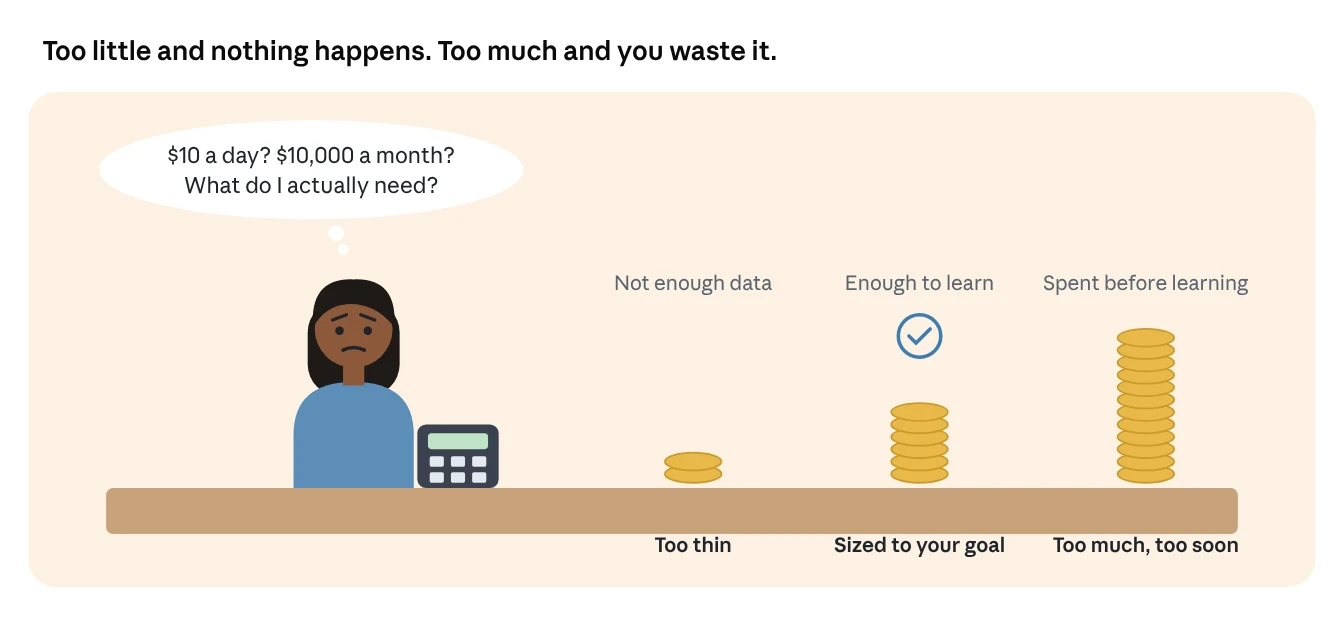
The founder’s budget dilemma
Every founder asks the same question. “How much should we spend on LinkedIn ads?” And every agency gives the same unhelpful answer: “It depends.”
It does depend. But not on mystery. It depends on four things you either know already or can estimate in an afternoon: how many meetings you need, how many leads turn into meetings, what a lead costs you, and how much you spend on building your brand. This article turns those four things into a simple calculator.
All the rules and minimums come from LinkedIn’s own pages. The example costs are clearly marked as examples, because your real costs depend on your audience, your offer and your ads.
What actually sets the price on LinkedIn
LinkedIn doesn’t have a price list. Every ad slot is sold in an auction, and four things decide what you pay. LinkedIn names them on its pricing help page: your target audience, your bidding strategy, your objective and your ad’s relevance score.
Here’s what each one means in practice:
| Factor | What it means | How it affects your budget |
|---|---|---|
| Target audience | Who you want to reach | Senior, in-demand audiences cost more because more advertisers bid for them |
| Bidding strategy | Maximum delivery, manual bidding or cost cap | Manual and cost cap give you more control over what each result costs |
| Objective | Awareness, engagement, video views, leads, conversions | Decides what you’re charged for: impressions, clicks, views or sends |
| Relevance score | How likely people are to engage with your ad | The more relevant your ad, the lower the price you pay |
Two auction details save you money without any extra effort:
You usually pay less than your bid. LinkedIn uses a second-price auction, so the winner pays just one cent more than the next highest bid.
Better ads win cheaper. LinkedIn multiplies each bid by a relevancy score. In LinkedIn’s own example, an $8 bid with a high relevancy score beats a $12 bid with a low one.
The pricing model depends on the format. Sponsored Content can be bought by cost per click or cost per 1,000 impressions. Sponsored messages are bought by cost per send, meaning you pay for each message successfully delivered.
What this means for your budget: two companies with the same budget can get very different results. The one with sharper targeting and more engaging ads gets more for every dollar. So the calculator below gives you a starting number, not a fixed price.
LinkedIn’s minimums and budget rules
You can start with as little as $10 a day per campaign, but LinkedIn’s own defaults suggest $25 to $100 a day is a more realistic place to begin.
| Rule | What LinkedIn says |
|---|---|
| Minimum daily budget | $10 per day, for any ad format |
| Minimum lifetime budget | $100 for a new campaign. After launch, it becomes $10 multiplied by the number of scheduled days |
| Suggested starting budget | Campaign Manager suggests $25 a day for new advertisers and $50 to $100 for existing ones (in USD) |
| Boosted posts | LinkedIn suggests budgeting more than $25 a day |
| Budget type | Daily, lifetime, or both. LinkedIn recommends a lifetime budget with lifetime pacing for the most efficient results |
| Audience size | Keep audiences above 50,000 for Sponsored Content and above 15,000 for Message Ads when starting out |
| Smallest usable audience | 300 members |
| Testing time | A/B tests need to run for at least 2 weeks |
What “lifetime pacing” means
LinkedIn looks a week ahead and spreads your budget across the days when it predicts the best opportunities. Think of it like a smart thermostat: instead of running at the same level all day, it works harder when it’s most useful. Some days spend more, some days less, but the total stays on track.
The minimum budget check
Before you settle on any number, run this quick check:
Minimum monthly spend = number of campaigns × $10 × 30.4 days
Four campaigns at the minimum come to about $1,216 a month. If your budget is below that, run fewer campaigns, not thinner ones.
The calculator: work backwards from meetings
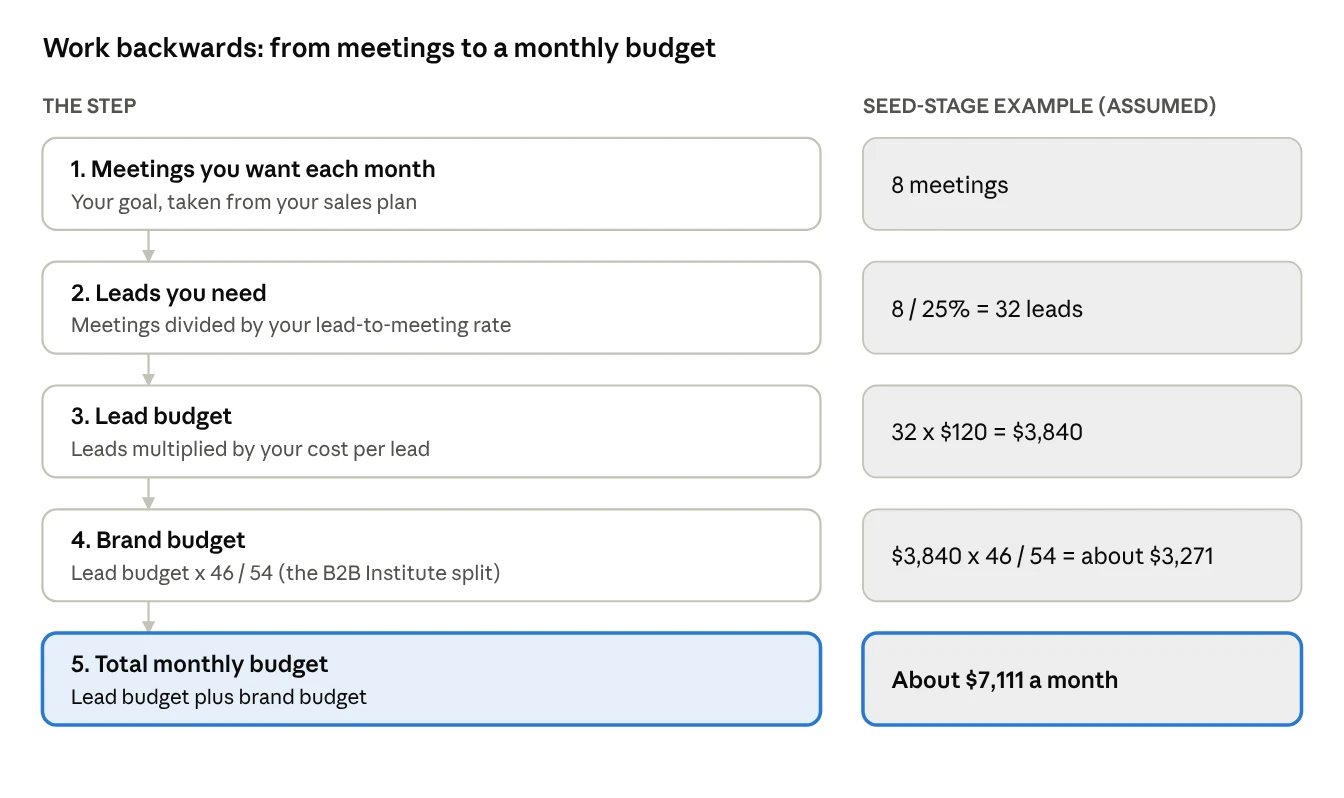
Your budget should come from your sales goal, not from a gut feeling. Start with the meetings you need, then work back to the money it takes to create them.
The four inputs you need
| Input | Where to get it | Example used above |
|---|---|---|
| Meetings you want per month | Your sales plan or revenue target | 8 |
| Lead-to-meeting rate | Your CRM: of all leads last quarter, how many became meetings? | 25% |
| Cost per lead | A 2 to 4 week test campaign, or your past LinkedIn results | $120 |
| Brand share | LinkedIn’s B2B Institute research (see below) | 46% brand, 54% leads |
Important: the example numbers are made up to show the maths. They are not LinkedIn benchmarks. Your real cost per lead depends on your audience, offer and ads, so run a short test and put your own number in.
Why add a brand budget at all?
Because leads alone don’t build a pipeline that lasts. Research by Les Binet and Peter Field for LinkedIn’s B2B Institute found that B2B businesses grow best when they put 46% of budget into brand building and 54% into activation, meaning ads aimed at an immediate response.
The reason ties back to timing. LinkedIn’s research shows 95% of your potential buyers aren’t ready to buy today. Brand ads reach those future buyers now, so your lead ads work better later. LinkedIn also reports that audiences who see both brand and acquisition messages are 6x more likely to convert.
The formula in one line
Monthly budget = (meetings ÷ lead-to-meeting rate) × cost per lead ÷ 0.54
Dividing by 0.54 is the same as adding the 46% brand share on top of the lead budget.
Three worked examples
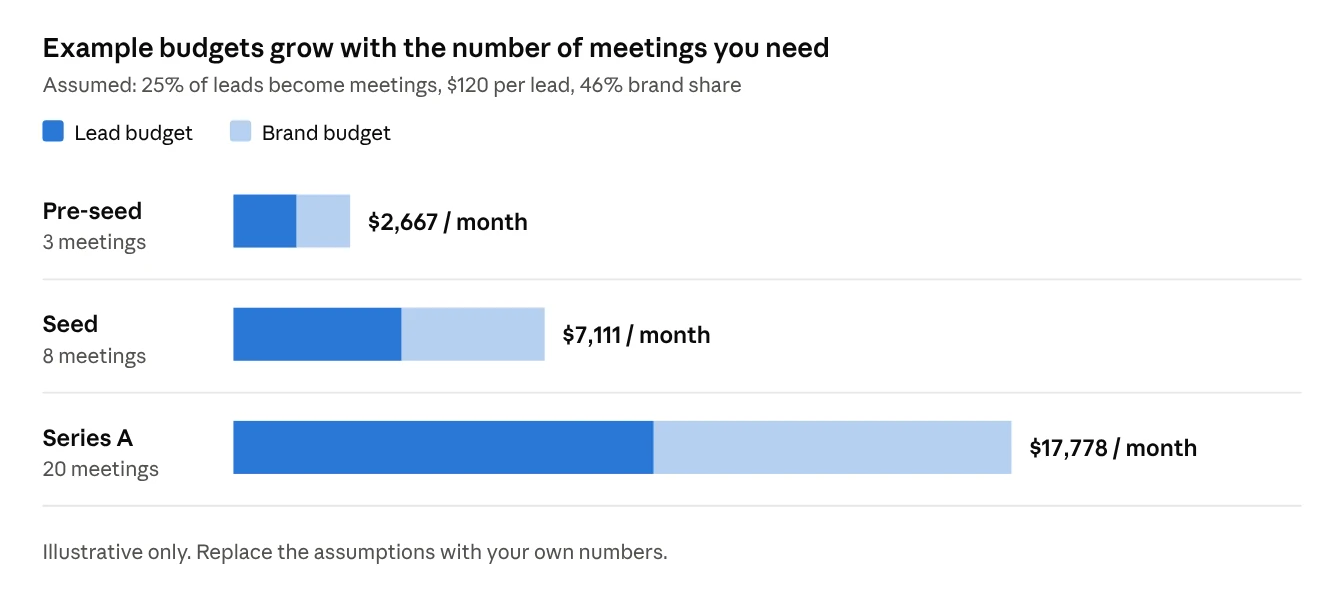
With the same assumptions, a pre-seed startup needs about $2,700 a month, a seed-stage startup about $7,100, and a Series A company about $17,800. The only thing that changes is how many meetings each one needs.
Here’s how each stage might use that money:
Pre-seed: 3 meetings a month (about $2,700)
Keep it to two or three campaigns. One Thought Leader Ad campaign from the founder to build familiarity, and one Lead Gen Form campaign retargeting people who engaged. At this size, every campaign needs to earn its place, because LinkedIn’s minimum is $10 a day each.
Seed: 8 meetings a month (about $7,100)
Now you can run a proper warm-up ladder: founder and expert Thought Leader Ads, a video or document ad for your account list, retargeting with Lead Gen Forms, and a Conversation Ad to the warmest audience. Run one A/B test at a time.
Series A: 20 meetings a month (about $17,800)
You can split by audience: separate campaigns for each industry or region, event promotion, and a steady test schedule. At this stage, the biggest risk isn’t spending too little. It’s spreading money across too many small campaigns so none of them learns anything.
Change one number, see what happens
The assumptions matter a lot. A few examples using the seed-stage goal of 8 meetings:
| If this changes… | Lead budget | Total budget |
|---|---|---|
| Base case: 25% meeting rate, $120 per lead | $3,840 | about $7,111 |
| Better follow-up lifts meeting rate to 40% | $2,400 | about $4,444 |
| Better ads cut cost per lead to $80 | $2,560 | about $4,741 |
| Both improvements together | $1,600 | about $2,963 |
Notice the lesson: improving your follow-up and your ads can cut the budget you need by more than half. That’s often a better investment than simply spending more.
How to split the budget across campaigns
Put the brand share into ads that make people familiar with you, and the lead share into ads aimed only at people who already engaged. Here’s one way to split the seed-stage example of about $7,111 a month:
| Campaign | Share | Monthly | About per day | Audience |
|---|---|---|---|---|
| Thought Leader Ads (founder and experts) | Brand | $1,800 | $59 | Target account list |
| Short video or document ad | Brand | $1,471 | $48 | Target account list |
| Lead Gen Form ad | Leads | $2,400 | $79 | People who engaged with the brand ads |
| Conversation Ad | Leads | $900 | $30 | Warmest audience: page visitors, video viewers |
| Test budget | Leads | $540 | $18 | One new idea at a time |
| Total | $7,111 | $234 |
Every campaign is comfortably above LinkedIn’s $10-a-day minimum, and the brand campaigns feed audiences into the lead campaigns. That flow is the point: the brand money makes the lead money cheaper.
When to change the split
Brand new company, nobody knows you: lean more toward brand at first. You can’t retarget people who never saw you.
Big event coming up: move part of the brand budget into Event Ads for a few weeks.
Lots of warm traffic already (from content, search or partners): lean more toward lead campaigns, because the warming is happening elsewhere.
LinkedIn’s B2B Institute has also discussed a 60/40 brand-to-demand split for full-funnel strategies. Either way, the message is the same: don’t put everything into lead ads.
Ways to stretch a small budget
On a small budget, the goal isn’t to reach everyone. It’s to become familiar to the right few thousand people.
Narrow the accounts, not the people. Pick fewer companies, but target the whole buying group inside them, so LinkedIn has enough people to deliver to.
Lead with Thought Leader Ads. Higher engagement means a better relevance score, and LinkedIn’s auction rewards that with lower prices.
Retarget everything. Video viewers, page visitors and form openers are your cheapest wins.
Use Lead Gen Forms. LinkedIn says they drive 2x more conversions because people don’t have to type their details.
Refresh ads monthly. LinkedIn notes click-through rates often drop when the same ad runs week after week.
Fewer campaigns, bigger budgets. Four well-funded campaigns learn faster than twelve starved ones.
Exclude customers. Don’t pay to warm up people who already buy from you.
Watch your Campaign Quality Score. It’s LinkedIn’s 1-to-10 stand-in for relevance. Low scores mean you’re overpaying.
Frequently asked questions
What’s the least I can spend on LinkedIn ads? Ten dollars a day per campaign. But at that level you’ll collect data slowly, so expect to wait longer before you learn what works.
Where do I get my cost per lead if I’ve never run ads? Run a 2 to 4 week test with one Lead Gen Form campaign aimed at a warm audience. Use that number in the calculator, then update it every month.
Should I use a daily or lifetime budget? LinkedIn recommends a lifetime budget with lifetime pacing for the most efficient results. A daily budget is easier to predict if you’re tracking spend closely.
How long before I judge whether it’s working? Give lead campaigns at least a month and brand campaigns at least a quarter. LinkedIn’s research found most marketers expect results within two weeks, and calls that expectation a myth.
Is this calculator a LinkedIn tool? No. It’s a planning method that uses LinkedIn’s published rules and the B2B Institute’s brand research. The example costs are assumptions, so always use your own numbers.
Need Help Sizing and Spending Your LinkedIn Ads Budget?
Stop guessing ad spend. Confia builds predictable full-funnel LinkedIn media plans tailored to your CAC, pipeline goals, and budget.
Sources
All from LinkedIn’s official sites.
Making the Most of Your Budget
LinkedIn’s advertising cost and pricing: LinkedIn Help
LinkedIn advertising auction: LinkedIn Help
LinkedIn Advertising Costs and Pricing
Campaign Quality Scores for Sponsored Content: LinkedIn Help
Best Practices for Ad Targeting
Retargeting with Matched Audiences: LinkedIn Help
Create an A/B test using the ad variable: LinkedIn Help
How B2B marketing really drives growth: LinkedIn Marketing Blog
Brand Awareness vs. Demand Generation: LinkedIn Marketing Blog
Why You Should Follow the 95-5 Rule: LinkedIn Marketing Blog
Advertise to LinkedIn’s Audience of Professionals
Best Practices for Sponsored Messaging
LinkedIn Ad Creatives: Best Practices: LinkedIn Help