

Short answer: for the first touch with a cold audience, Thought Leader Ads usually win, because people pay more attention to people than to logos. For capturing leads and driving sign-ups, Company Page ads still win, because they can do things Thought Leader Ads can’t. The cheapest pipeline comes from using both in the right order.
This article explains why, using LinkedIn’s own numbers, and shows you how to test it on your own account.
A tale of two posts
Imagine two posts appear in your LinkedIn feed on a Monday morning.
The first is from a software company’s page. It has a polished graphic, a tagline and a “Learn more” button. You’ve seen a hundred like it this week. You keep scrolling.
The second is from Meera, the head of finance at that same company. She writes: “We closed our books in 4 days instead of 12 last quarter. Here are the three boring changes that did it.” There’s a photo of her team’s whiteboard. You stop. You read it. You might even comment.
Same company. Same budget. Same audience. One got ignored, the other got read.
That’s the whole debate in a nutshell. LinkedIn even quotes one of its own advertisers saying it plainly: people enjoy hearing from people.
What each ad type actually is
A Company Page ad speaks with your brand’s voice. A Thought Leader Ad speaks with a real person’s voice. Both appear in the LinkedIn feed, both are paid for by your company, and both are labelled as promoted.
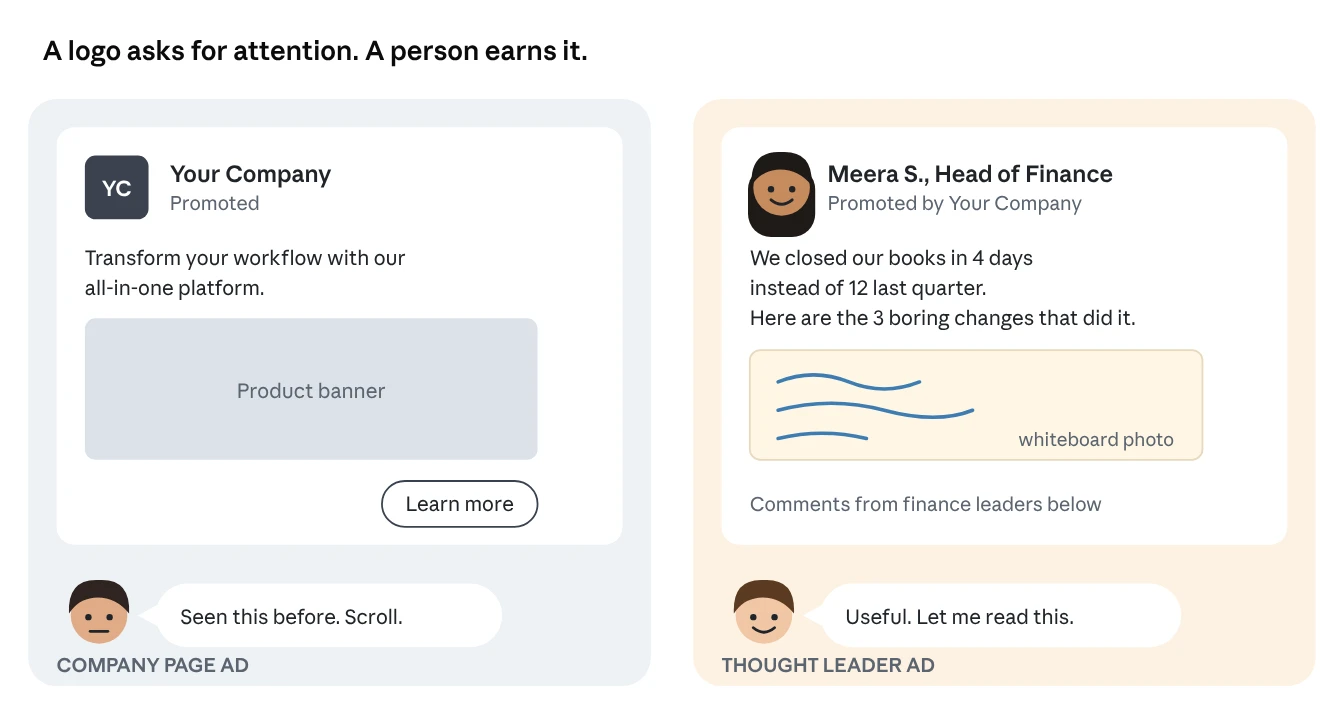
Company Page ads are posts from your LinkedIn Page, or ads built directly in Campaign Manager, that LinkedIn calls Direct Sponsored Content. They carry your logo and your company name. They’re the classic LinkedIn ad.
Thought Leader Ads let you pay to show a real person’s post to your chosen audience. That person can be your founder, an employee, a customer or an industry expert. LinkedIn describes them as a way to promote content from executives, subject matter experts, or employees directly in the LinkedIn feed.
Since 2024, you aren’t limited to your own staff. LinkedIn expanded the format so brands can sponsor content from any member, including people outside your organisation, such as a happy customer’s post about you. The person always has to approve it first.
| Company Page ad | Thought Leader Ad | |
|---|---|---|
| Who appears to be speaking | Your brand | A real person |
| Where the content comes from | Your Page or Campaign Manager | A member’s own public post |
| Needs permission | No | Yes, the author must approve |
| Keeps likes and comments from the original post | Only if you sponsor a Page post | Yes |
| Available objectives | All, including lead generation and website conversions | Brand awareness, engagement and video views |
| Call-to-action button | Yes | Not on image or video posts; a link goes in the text |
What LinkedIn’s own numbers say
LinkedIn’s pilot data shows Thought Leader Ads get noticeably more clicks and engagement than standard image ads. In LinkedIn’s early pilot, Thought Leader Ads had a 1.7x higher click-through rate and a 1.6x higher engagement rate than other single-image ad campaigns. LinkedIn is careful to call this directional, because early testers may not be typical. But the direction is clear.
It matches a pattern LinkedIn has measured for years in its employee advocacy research:
| What LinkedIn found | Number |
|---|---|
| Employees’ combined networks compared with company followers | 10x more connections |
| Click-through rate when content is shared by an employee instead of the company | 2x higher |
| Trust in company information from an employee compared with the CEO (Edelman Trust Barometer, cited by LinkedIn) | 3x more likely to trust |
| B2B decision makers who say referrals from people they know and respect earn their attention (LinkedIn and Edelman) | 90% |
| Share of a Page post’s engagement that comes from the company’s own employees | 30% |
LinkedIn’s marketing team sums it up in one line: people follow brands on LinkedIn, but they engage with the people behind those brands.
What LinkedIn doesn’t publish is a cost-per-lead comparison between the two formats. Anyone who quotes you an exact “Thought Leader Ads are X% cheaper” figure is quoting their own accounts, not LinkedIn. That’s why the test later in this article matters: your numbers beat anyone’s averages.
Why people-led ads usually cost less per result
LinkedIn’s ad auction rewards ads people actually engage with, so an ad that earns more clicks and comments can win with a lower bid. This is the hidden reason Thought Leader Ads often end up cheaper.
Here’s how the auction works, in simple terms. Every time someone opens LinkedIn, advertisers compete to show them an ad. LinkedIn doesn’t just pick the highest bidder. It multiplies each bid by a relevancy score, and the highest combined score wins.
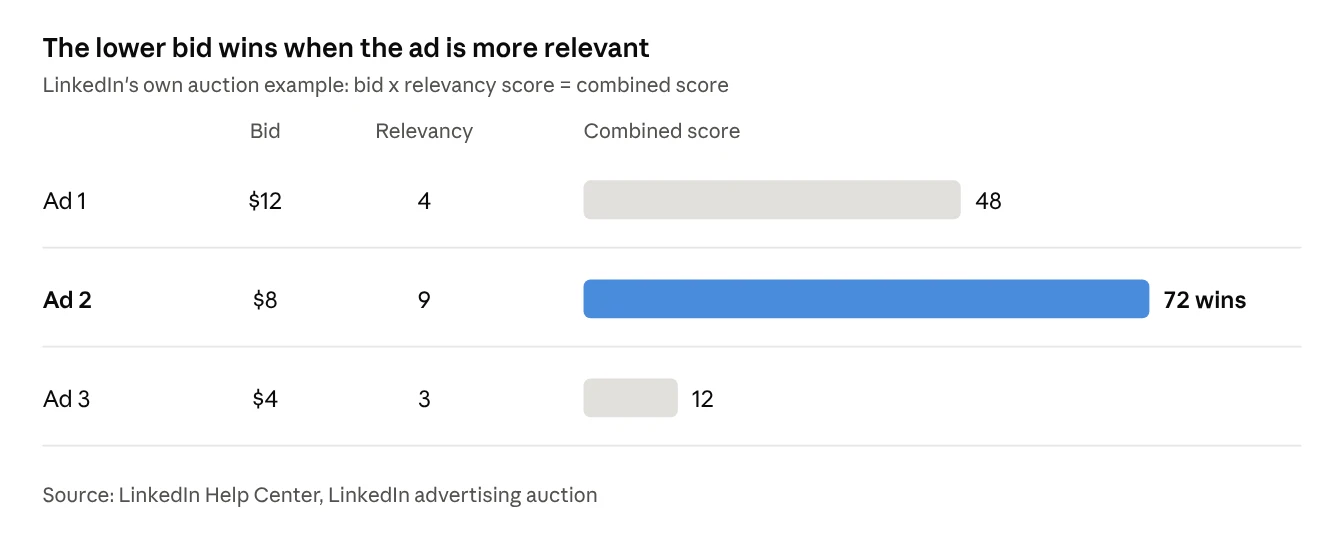
In LinkedIn’s own example, Ad 2 bids only $8 but wins, because people are far more likely to engage with it. The relevancy score is based on things like expected click-through rate, comments, likes and shares. LinkedIn says it plainly on its pricing page: the more relevant your ad, the lower the price you pay.
And you rarely pay your full bid. LinkedIn uses a second-price auction, so the winner pays just one cent more than the next highest bid.
Connecting the dots to pipeline
Put it together and you get a simple chain:
A real person’s post earns more clicks, comments and shares.
Higher engagement means a higher relevancy score.
A higher relevancy score wins auctions at lower bids, so each impression and click costs less.
Cheaper engagement builds bigger retargeting audiences for the same budget.
Those warm audiences convert into leads and meetings more cheaply later.
That last step is key. Thought Leader Ads rarely produce the lead themselves, because they can’t run with a lead generation objective. Their job is to make step 5 cheaper.
You can watch this happen in your own account. LinkedIn can’t show you the relevancy score itself, but it gives you a Campaign Quality Score from 1 to 10 as a stand-in. If your Thought Leader campaigns score higher than your Company Page campaigns aimed at the same audience, the auction is rewarding them.
When Company Page ads still win
Company Page ads win whenever you need a direct action: a form fill, a sign-up, a demo request or a website conversion. Thought Leader Ads are built for attention. Company Page ads are built for action.
Here’s why, straight from LinkedIn’s rules:
Objectives. Thought Leader Ads only run with brand awareness, engagement or video views objectives. No lead generation, no website conversions. Company Page ads can use every objective.
Buttons. Thought Leader image and video ads have no call-to-action button. You can only add a link in the text. Company Page ads get a proper button, like “Download” or “Register”.
Formats. Documents, polls, multi-image posts and reposts can’t be promoted as Thought Leader Ads. If your best asset is a downloadable guide, a Company Page document ad is the way to promote it.
Control. A Thought Leader Ad depends on someone else’s permission. The author can revoke it at any time, and the ad turns off immediately. A Company Page ad is fully yours.
Speed. If you need ten ad variations by Friday, you can build them in Campaign Manager. A thought leader can’t write ten genuine posts by Friday.
So the honest answer to “which is cheaper?” is: Thought Leader Ads are usually cheaper at getting attention. Company Page ads are usually the only option for capturing the lead. The cheapest pipeline uses Thought Leader Ads to warm people up, then Company Page ads to ask for the action.
| Your goal | Best choice |
|---|---|
| Introduce your brand to a cold audience | Thought Leader Ads |
| Build trust with senior buyers | Thought Leader Ads from a senior leader |
| Share a customer’s success story in their own words | Thought Leader Ad on the customer’s post |
| Collect leads with a pre-filled form | Company Page ad with a Lead Gen Form |
| Promote a downloadable guide | Company Page document ad |
| Drive event or webinar sign-ups | Either, since LinkedIn supports event Thought Leader Ads with a button |
| Retarget warm audiences toward a demo | Company Page ad, then a Conversation Ad |
How to run a fair head-to-head test
Don’t compare the two formats on clicks alone. Compare them on what each one does to your cost per lead after retargeting. That’s the only fair test, because Thought Leader Ads can’t collect leads directly.
LinkedIn has a built-in tool for this. Its A/B testing feature compares two campaigns that differ by just one thing, and it splits the audience automatically so the same person only sees one version.
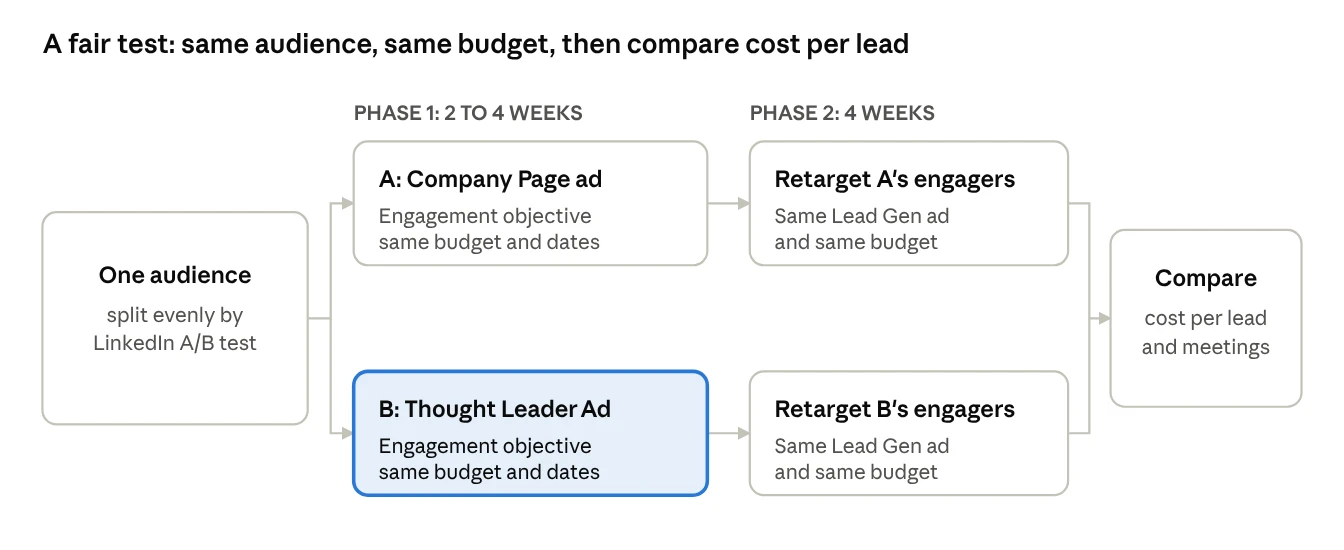
Phase 1: the attention test (2 to 4 weeks)
In Campaign Manager, go to Test, then Create test, then A/B test, and choose Ad as the variable.
Use the engagement objective for both, since that’s an objective Thought Leader Ads support.
Campaign A gets a Company Page ad. Campaign B gets a Thought Leader Ad on the same topic, ideally with the same core message.
Let it run. LinkedIn requires A/B tests to run for at least 2 weeks and at most 90 days.
Write down for each: cost per engagement, click-through rate, and Campaign Quality Score.
Phase 2: the pipeline test (4 weeks)
Build two retargeting audiences: people who engaged with ad A, and people who engaged with ad B.
Show both audiences the exact same Lead Gen Form ad, with the same budget.
Compare cost per lead, then follow those leads to meetings booked.
Total cost per lead = Phase 1 spend + Phase 2 spend, divided by leads. Whichever lane wins on that number is your cheaper pipeline. Not the one with the prettier click-through rate.
Rules that keep the test honest
Same audience, same budget, same dates, same objective. Change only the ad.
Pick a real topic your buyers care about, not a product announcement.
Sponsor a fresh post. LinkedIn suggests promoting posts less than 30 days old.
Ask the thought leader to note their organic numbers before you start, so you can see what the paid boost added.
Accept that a test can be a draw. LinkedIn notes that there may be no clear winner when the difference is small or there’s not enough data.
How to set up a Thought Leader Ad
Setting one up takes about ten minutes, plus however long your thought leader takes to approve the request.
Check your access. You need super admin, content admin or Sponsored Content poster access on your company Page, and creative manager access or higher on the ad account.
Create an ad set with the brand awareness, engagement or video views objective. Pick the format that matches the post: single image, video, article and newsletter, or event.
Click “Browse existing content”, then choose LinkedIn members, and search by the person’s name or the post’s link.
Request permission. The author gets an email and approves it. They can approve just this post, or all current and future requests to save time later.
Launch. The ad uses the original post as the creative, so there’s no need to make your own creative or copy.
What makes a post eligible
The author’s profile shows their full name and the post is public.
It’s a text, single image, video, article or newsletter post.
It’s not a document, poll, celebration, multi-image post or repost.
All three come from LinkedIn’s Thought Leader Ads help page.
What makes a post work
LinkedIn’s own tips for thought leaders boil down to this: share a sharp point of view on an industry trend, give advice people can use in their day-to-day, add an image or video, ask a question, and reply to comments. In short, post like a person, not a press release.
Two extra reporting metrics come with this format: member follows and clicks to member profile. If both climb, your thought leader is becoming a familiar face in your market, which is exactly what makes later outreach easier.
Common mistakes
Turning the thought leader into a billboard. If the post reads like an ad, people treat it like one. Keep the product out of most posts.
Judging them by leads. They can’t use the lead generation objective, so judge them by what they do to retargeting costs.
Only promoting the CEO. Customers, product experts and sales leaders all work. LinkedIn now lets you sponsor posts from people outside your company too.
Promoting old posts. Stick to posts under 30 days old so the comments look current.
Forgetting the person can say no. Always have a backup post ready in case permission is revoked.
Frequently asked questions
Do I need the person’s login or password? No. They simply approve a request that LinkedIn emails to them.
Can I edit their post before promoting it? No. You promote the post exactly as they published it, likes and comments included.
Can I promote a customer’s post about us? Yes, with their approval. LinkedIn added this in 2024 so brands can amplify things like customer testimonials.
Will people know it’s an ad? Yes. It’s labelled as promoted by your company, which keeps it transparent.
Which should I start with if I only have a small budget? Start with Thought Leader Ads to build a warm audience, then put a smaller amount into a Company Page Lead Gen ad aimed only at the people who engaged.
Ready to Test Thought Leader Ads for Your Brand?
At Confia, we help B2B marketing leaders scale executive and founder-led LinkedIn ad campaigns that lower CPC and drive cheaper pipeline.
Sources
All from LinkedIn’s official sites.
Thought Leader Ads and Thought Leader Ads two-pager (PDF)
Thought Leader Ads: LinkedIn Help
Create thought leader ads in Campaign Manager: LinkedIn Help
7 New LinkedIn Ads Features to Stretch Your Budget: LinkedIn Marketing Blog
The Official Guide to Employee Advocacy (PDF)
Top Tips for Measuring and Improving Engagement on LinkedIn: LinkedIn Marketing Blog
LinkedIn advertising auction: LinkedIn Help
LinkedIn Advertising Costs and Pricing
Campaign Quality Scores for Sponsored Content: LinkedIn Help
A/B Testing and Create an A/B test using the ad variable: LinkedIn Help