

Short answer: most deals stall because the people who must approve the purchase have never met you. LinkedIn ads let you reach those people directly: finance, IT, operations, and leadership at the exact companies in your pipeline. Show each group the proof it needs, then let your sales team follow up with whoever engages.
Why good deals go quiet
You’ve seen it happen. The demo went brilliantly. Your contact said, “This is exactly what we need.” Then… nothing. Emails go unanswered. The follow-up call gets moved twice. The deal sits in “Negotiation” for six weeks.
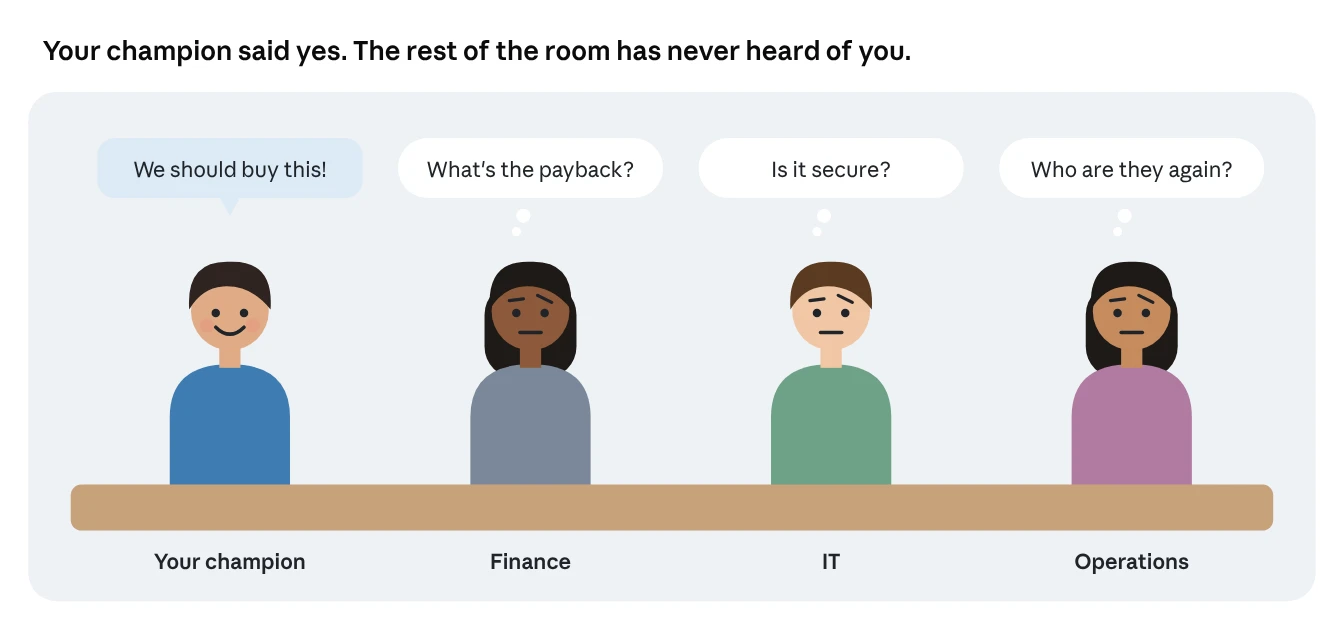
Usually, your contact hasn’t lost interest. They’re stuck inside their own company, trying to convince people you’ve never spoken to. The finance lead wants proof of payback. IT wants to know it’s secure. The operations head has never heard your name. Your champion is selling for you, without your help.
That’s where LinkedIn ads for stalled deals come in. You can’t email those people, because you don’t know who they are. But you can put the right message in front of them, right where they spend their working day.
The hidden buying group
A B2B purchase is a group decision, and most of the group never talks to your sales team. LinkedIn’s sales blog cites CEB research showing an average of 6.8 decision makers involved in a B2B purchase, and that number keeps rising.
It’s not just more people. It’s more departments. LinkedIn’s own research found that 3.1 to 4.6 groups inside a company, such as IT, finance and HR, influence the average purchase. In a survey of 6,000 buyers, marketers and salespeople, LinkedIn found these departments had the most influence:
| Department | Share saying it influences the decision |
|---|---|
| IT | 32% |
| Finance | 31% |
| Business development | 26% |
| Accounting | 23% |
| Operations | 22% |
| Administrative | 21% |
And these journeys can be long. In LinkedIn’s technology buying research, 44% of purchasing journeys extended beyond one year.
Why this causes stalls
Think of it like trying to book a family holiday. One person loves the destination. But someone worries about the cost, someone else about the flights, and someone hasn’t even seen the brochure. Nothing gets booked until everyone’s on board.
Your champion is the person who loves the destination. Your job is to get the brochure in front of everyone else.
There’s a second risk too. People change jobs. LinkedIn’s data shows North American decision makers are 65% more likely to change jobs in January than in any other month. If your only contact leaves, a deal with one relationship dies. A deal where five people know your name survives.
The deal acceleration play
Pull your stalled deals from the CRM, target everyone who influences the decision at those companies, show ads that answer their doubts, and tell sales which accounts are warming up. Then repeat every week until the deal moves.
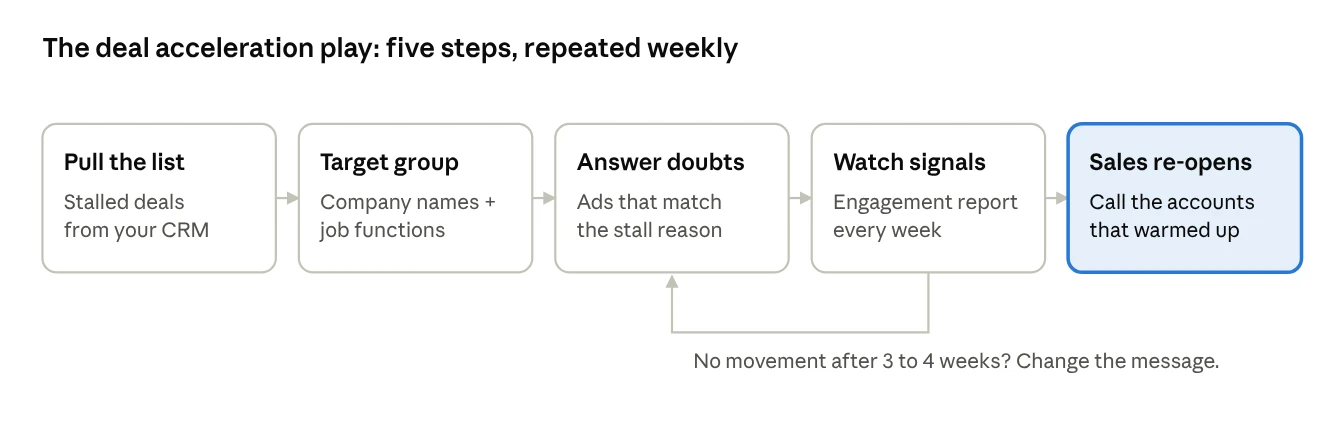
This is the same approach LinkedIn describes for account-based marketing: reach stakeholders across target accounts with ads tailored to their role and stage of the buying cycle, then follow up with a short, personal message from a sales rep.
The difference here is focus. Instead of hundreds of target accounts, you’re working on the handful of deals already in your pipeline. These are companies that already know their problem and have already seen your solution. They just need the rest of the room to catch up.
Step by step: build the audience from your CRM
Small lists need a different approach from big ones. LinkedIn needs at least 300 rows to upload a list, and at least 300 matched members before a campaign can run. A list of 15 stalled deals won’t upload on its own. Here are three ways around that, from simplest to most automated.
Option A: Type the company names into targeting (best for under 100 deals)
In your campaign’s audience settings, use the Company Name option. LinkedIn lets you target up to 100 companies this way, no upload needed.
Export the stalled opportunities from your CRM.
In Campaign Manager, create a campaign and open the audience section.
Add each company under Company Name.
Add job functions for the buying group, such as Finance, Information Technology and Operations.
Check the estimated audience. If it’s under 300, add more functions or more open deals.
Option B: Upload your whole open pipeline (best for 300+ accounts)
If you have hundreds of open opportunities, upload them all as a company list. Use LinkedIn’s CSV template and include each company’s website or LinkedIn Page URL to improve matching. Lists can hold up to 300,000 companies and take up to 48 hours to match.
Then use the Company Engagement Report (more on that below) to split your pipeline into segments by engagement.
Option C: Connect your CRM (best for ongoing programs)
LinkedIn integrates with CRM and marketing partners so your lists populate automatically. For example, LinkedIn’s HubSpot guide describes creating audiences from HubSpot contacts and target accounts that sync with Campaign Manager. Integrated audiences usually process in 48 hours or less.
A few rules for every option
Exclude your champion’s team if they’re already sold. Spend on the people who aren’t.
Exclude closed-won customers, unless you’re running an upsell play.
Contact lists of known stakeholders can work too: LinkedIn accepts up to 300,000 contacts by email. Only use contacts you’re allowed to market to.
Remember privacy rules. In the EU, EEA and Switzerland, LinkedIn only matches members who’ve opted in, so expect smaller audiences there.
What to show for each reason a deal stalls
Match the ad to the doubt, and the doubt to the department. Ask your sales rep one question for each stalled deal: “What’s really holding this up?” Then use the table below.
| Why it stalled | Who’s usually doubting | What to show them | Best format |
|---|---|---|---|
| “Not sure it’s worth the money” | Finance | A payback example or ROI story from a similar company | Document ad or Thought Leader Ad from a customer |
| “Is it secure? Will it fit our systems?” | IT | Security overview, integration list, a short technical walkthrough | Document ad or video |
| “Who are these people?” | Leadership, operations | Founder or expert posts, a well-known customer’s story | Thought Leader Ads |
| “Our team won’t use it” | Operations, end users | A short demo of daily use, a customer quote about adoption | Video ad |
| “Not a priority right now” | Leadership | The cost of waiting, an industry benchmark | Thought Leader Ad or document ad |
| “We’re also looking at others” | The whole group | Head-to-head comparison, customer switching stories | Document ad, then a Conversation Ad |
Why customer voices work so well here
At this stage, buyers trust peers more than vendors. LinkedIn lets you promote a happy customer’s own post as a Thought Leader Ad, with their permission. Since 2024 that includes members outside your company, and LinkedIn and Edelman found 90% of B2B decision makers say referrals from people they know and respect are effective in earning their attention.
Keep it helpful, not creepy
These ads reach real people at companies you’re in active talks with. So never mention the deal, the company name in a pointed way, or anything said in a sales meeting. The ads should feel like useful content that happens to appear at the right time, not like you’re watching them.
Working with sales: signals and timing
Marketing runs the ads. Sales watches which accounts wake up, and reaches out to new people inside them. That handoff is where stalled deals start moving again.
The signal: the Company Engagement Report
If you uploaded a company list, Campaign Manager gives you a free Company Engagement Report. For each company, it shows how many people you reached, impressions, ad engagement, and an overall engagement level from very low to very high. That level combines ad engagement, organic engagement with your Page, and website visits, compared against other companies.
You can filter by engagement level and save the result as a company segment. LinkedIn recommends a dynamic segment, which updates daily based on the past 90 days. You can also export the report as a CSV and share it with sales.
LinkedIn’s own guidance says it plainly: high engagement is a sign that people at those companies would be receptive to a personal message from a salesperson.
The weekly routine
Monday: marketing exports the engagement report for stalled accounts.
Same day: sales reviews which accounts moved up a level.
That week: for each warming account, the rep finds new stakeholders in the departments the ads targeted and reaches out with something useful.
Every 3 to 4 weeks: if an account hasn’t moved, change the message for that stall reason.
How reps should reach out
Sales Navigator data gives reps a few useful rules:
Research first. Prospects are 86% more likely to accept an InMail if the rep viewed their profile first.
Use shared connections. Having at least one common connection led to 19% fewer InMail rejections.
Build more than one relationship. Sellers with at least four connections at a target account are 16% more likely to close a deal there.
Stay relevant. 68% of buyers say they’re unlikely to engage with a seller who reaches out with information irrelevant to their job.
A good message to a new stakeholder sounds like: “I’m working with your colleagues on [project]. People in [their role] usually ask about [their likely concern], so here’s a two-page answer. Happy to talk it through.”
How to measure the impact
Compare stalled deals that got ads with stalled deals that didn’t. That’s the cleanest way to see whether the play works.
| What to track | Why it matters |
|---|---|
| Engagement level change per account | Shows the buying group noticing you |
| New contacts added to each opportunity | Shows the deal spreading beyond one champion |
| Days since last meaningful activity | Shows whether the deal is moving again |
| Stage progression in 30, 60, 90 days | The real outcome |
| Win rate vs. similar deals without ads | Proves the value of the spend |
Because these are small, focused audiences, this play is usually cheap compared with the value of the deals involved. Just keep LinkedIn’s $10-a-day campaign minimum in mind, and group stalled accounts into a few campaigns by stall reason rather than one campaign per deal.
Common mistakes
Targeting only your champion. They’re already convinced. Aim at everyone else.
Running generic brand ads. Each stall has a reason. Speak to it.
Forgetting the minimum audience. Under 300 members, nothing runs. Widen functions or combine deals.
Marketing and sales working separately. If sales never sees the engagement report, the ads are only half the play.
Being too specific. Never reference the deal or the meeting in an ad.
Giving up after a week. Give it three to four weeks before changing the message.
Frequently asked questions
Can I target specific people at a company? You can upload a contact list of people you’re allowed to market to, but most deal-acceleration plays work better targeting job functions at the company, because you don’t know every stakeholder.
Will the people see that the ad was aimed at them? No. They see a normal ad in their feed, labelled as promoted. They don’t know who else saw it.
How many stalled deals do I need to start? Any number works with Option A, as long as the combined audience reaches 300 members. Most teams start with their 10 to 30 most valuable stuck deals.
Does this work for renewals and upsells too? Yes. The same play works for at-risk renewals and expansion deals, where new stakeholders need to understand the value you’ve already delivered.
Have High-Value Deals Sitting Stalled in Pipeline?
Let us help you surround the hidden buying committee with targeted LinkedIn ads that answer doubts and reignite sales conversations.
Sources
All from LinkedIn’s official sites.
What You Need to Know About Decision Maker Job Changes: LinkedIn Sales Blog
What Are Influencers, and How Do They Affect the B2B Buyer’s Journey?: LinkedIn Sales Blog
Which Departments Influence Buying Decisions in Your Industry?: LinkedIn Marketing Blog
LinkedIn’s 7th Annual Technology Buying Research
What Is Account Based Marketing: LinkedIn Marketing Blog
Requirements for company targeting lists: LinkedIn Help
Reach your audience: Targeting on LinkedIn (PDF)
HubSpot-LinkedIn Integration: Better Together (PDF)
Get started with data integrations for matched audiences: LinkedIn Help
Company Engagement Report: LinkedIn Help
Measure engagement from your key companies
7 New LinkedIn Ads Features to Stretch Your Budget: LinkedIn Marketing Blog
Benefits of LinkedIn Sales Navigator
Activating Buyer-first Principles with Sales Navigator: LinkedIn Sales Blog
From Social Selling Index (SSI) to AI
How to Best Use Sales Navigator: 9 Best Practices: LinkedIn Sales Blog