
Short answer: the sponsored messages that book demos don’t open with “Book a demo”. They open with something useful, give people two or three easy choices, and make the demo one of those choices. Below are seven ready-to-adapt LinkedIn Conversation Ad templates, each with its branching flow drawn out, plus the LinkedIn rules they’re built on.
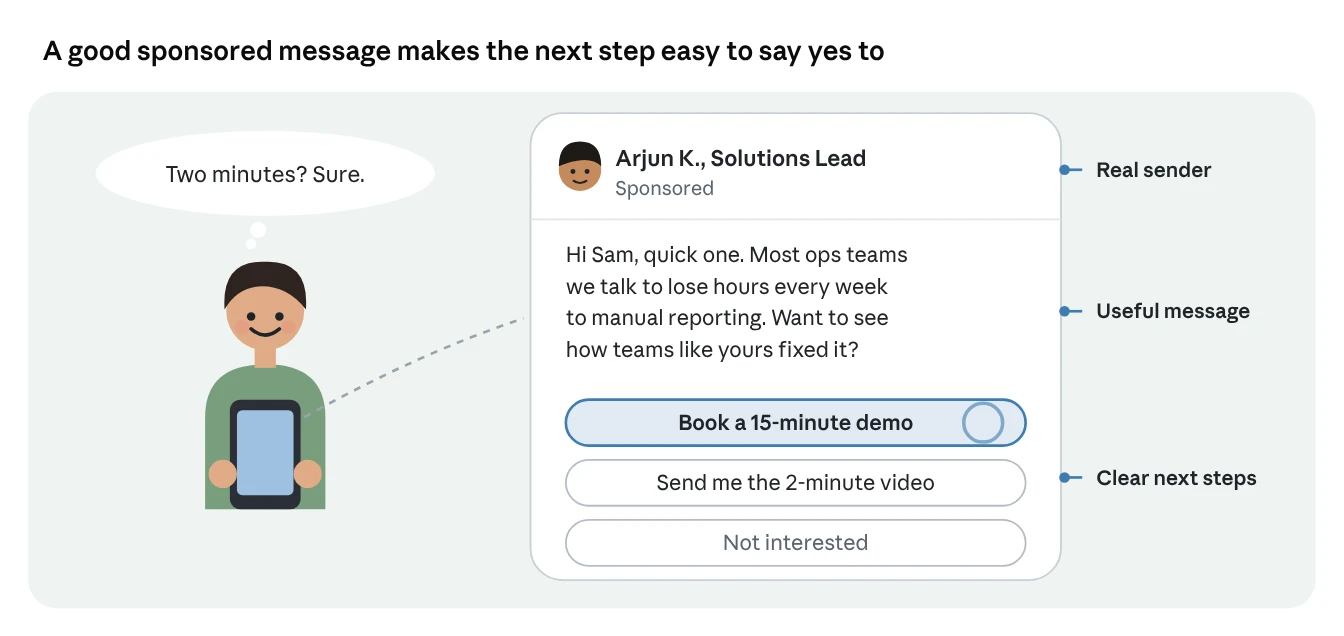
Why branching messages work
Think about walking into a shop. A good salesperson doesn’t shout “Buy this!” They ask, “Just browsing, or looking for something specific?” Then they follow your lead.
LinkedIn’s Conversation Ads work the same way. You write the message, plus a few reply buttons, and each button leads to a different next step. LinkedIn calls it a message decision tree you create. The reader picks their own path, so the ad feels like a conversation instead of a pitch.
One important tip before we start: these templates work best on warm audiences, meaning people who already watched your video, visited your site or engaged with your posts. Sent to complete strangers, even the best template is still a cold message.
The ground rules every template follows
Keep it short, send it from a real person, and give two or three useful buttons. These rules come straight from LinkedIn’s specs and best-practice pages, and every template below sticks to them.
| Rule | LinkedIn’s guidance |
|---|---|
| Subject line | Up to 60 characters. Short, with a clear value |
| Message length | Up to 8,000 characters allowed, but LinkedIn nudges you past 500 because shorter messages can drive higher engagement |
| Buttons | Up to 5 per message and 50 per conversation, 25 characters each |
| “Not interested” | Required and added automatically to the first message, so plan for four custom buttons at most |
| Layers | LinkedIn suggests 2 to 3 messages with at least 2 buttons |
| Tone | Warm and helpful, the way you’d speak on the phone |
| Personalisation | Macros can insert first name, last name, company name, job title or industry |
| Sender | Sending from a recognised, credible person helps |
| Lead capture | Lead Gen Forms, which LinkedIn says drive 2x more conversions |
| Objective | With lead generation, one button must open a Lead Gen Form. With website visits, at least two buttons must lead to a landing page |
| Europe | Conversation Ads can’t target members in the EU |
How to read the flow diagrams
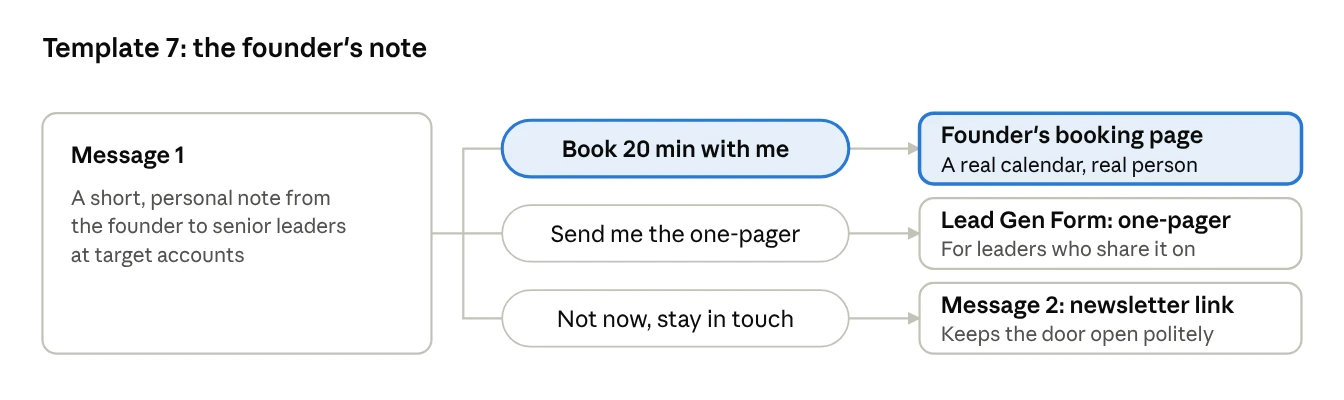
Each template has a small diagram. The box on the left is the first message. The middle column shows the buttons, written exactly as they’d appear. The right column shows what happens when someone clicks. The highlighted button is the one you most want people to press.
In every message, %FIRSTNAME% is LinkedIn’s macro for the reader’s first name. Swap the details in [square brackets] for your own.
Template 1: The warm follow-up
Best for: people who read, downloaded or watched something of yours in the last 30 to 90 days.
Audience: a retargeting audience of document ad readers, video viewers or Lead Gen Form openers.
Why it works: they already chose to spend time with your content. You’re simply offering the logical next step.
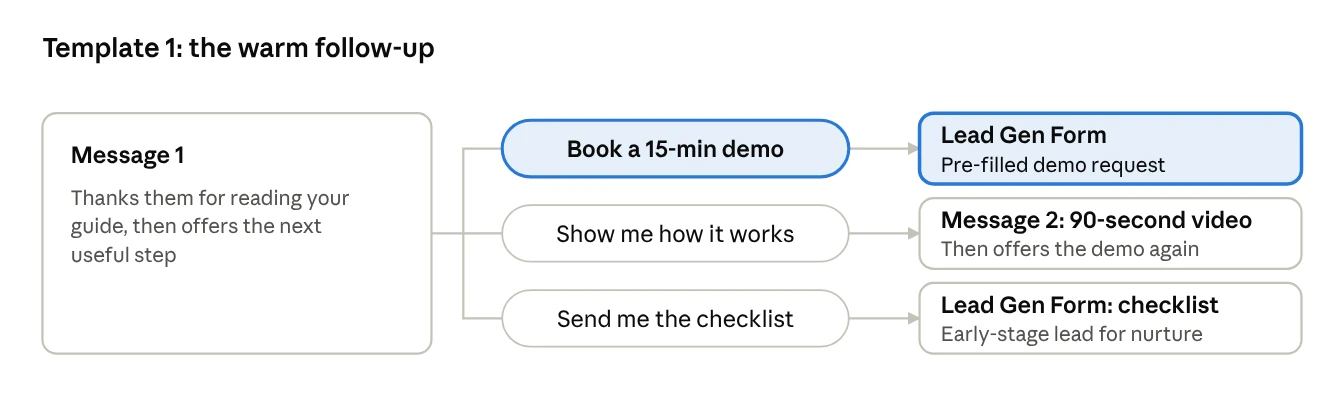
Subject: A next step after the [topic] guide
Hi %FIRSTNAME%, I’m [Name], and I wrote the [topic] guide our team shared on LinkedIn recently. A lot of readers ask the same follow-up question: “How does this look in practice?”
I can show you in 15 minutes, using an example from a company like [company type]. Or, if you’d rather explore on your own, I can send a 90-second video or our one-page checklist.
Buttons: Book a 15-min demo · Show me how it works · Send me the checklist
Message 2 (after “Show me how it works”):
Here’s the 90-second version: [link]. Most teams start by fixing [first quick win]. If you’d like to see that on your own setup, I’m happy to walk you through it.
[Book a 15-min demo] [Not right now]
Tip: the checklist button looks like a “lesser” result, but it isn’t. It captures people who aren’t ready for a demo yet, so sales can follow up when the timing is right.
Template 2: The benchmark offer
Best for: target accounts that have seen your ads but haven’t engaged deeply yet.
Audience: your company list, layered with job function, or people who engaged with your feed ads.
Why it works: everyone wants to know how they compare with their peers. Data is a gift, not a pitch.
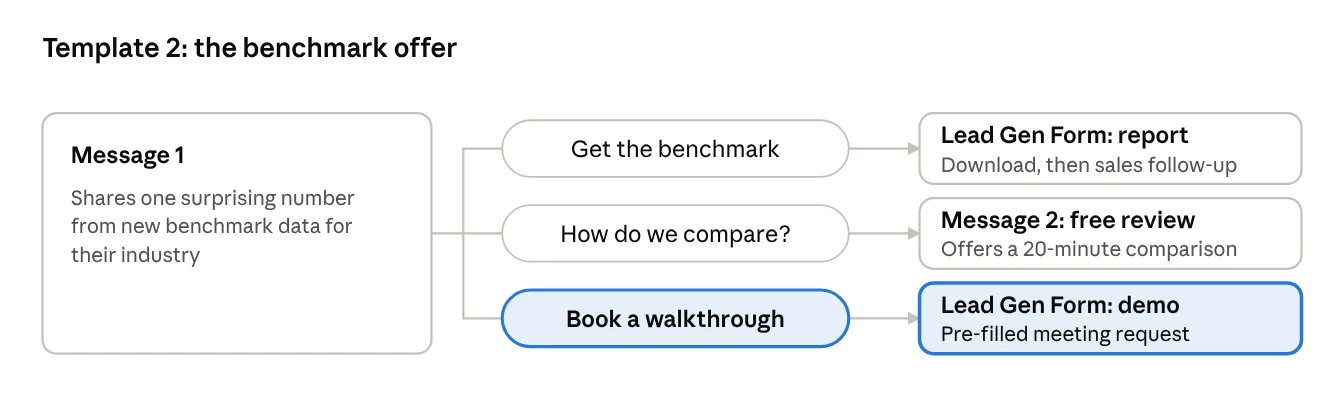
Subject: How [industry] teams are doing on [metric] this year
Hi %FIRSTNAME%, we just finished a benchmark of [number] [industry] companies. One finding surprised us: [one striking, true finding].
The full report is free. If you’d like, we can also do a 20-minute review to see where [Company] sits against your peers.
Buttons: Get the benchmark · How do we compare? · Book a walkthrough
Message 2 (after “How do we compare?”):
Good question to ask. In 20 minutes, we’ll compare three numbers from your side with the benchmark and show you where the biggest gap is. No prep needed.
[Book my review] [Just send the report]
Tip: only use findings you can stand behind. LinkedIn’s company name macro can fill in [Company] automatically, so the review offer feels tailored without any manual work.
Template 3: The webinar follow-up
Best for: the week after a webinar or LinkedIn Event.
Audience: an event audience of people who registered for your LinkedIn Event, whether or not they attended.
Why it works: they raised their hand once already. The speaker reaching out personally feels like a natural continuation, not a cold message.
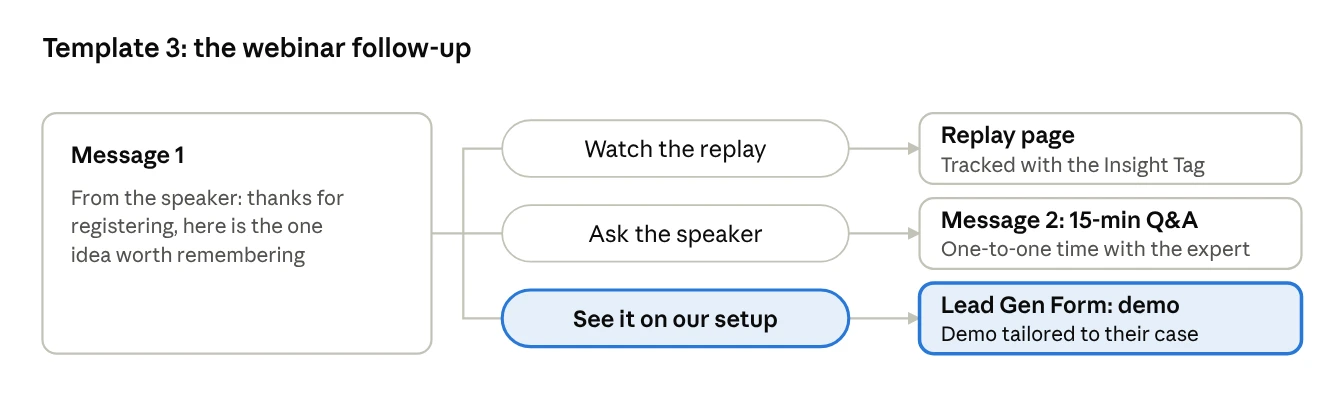
Subject: The one idea from [webinar title]
Hi %FIRSTNAME%, thanks for registering for [webinar title]. If you only remember one thing, make it this: [single biggest takeaway].
The replay is ready if you missed any of it. And if you’d like to see how this would work for [your team / your industry], I’m happy to show you.
Buttons: Watch the replay · Ask the speaker · See it on our setup
Message 2 (after “Ask the speaker”):
I’d love to hear your question. I keep a few 15-minute slots open each week for people who attended. Pick one that suits you.
[Book 15 minutes] [Send me the slides]
Tip: don’t send the same message to attendees and no-shows if you can split them. For no-shows, lead with the replay. For attendees, lead with the one-to-one offer.
Template 4: The pricing-page visitor
Best for: people who visited your pricing page but didn’t get in touch.
Audience: a website retargeting audience built from visits to your pricing URL in the last 30 days, using the Insight Tag.
Why it works: visiting a pricing page is one of the strongest buying signals there is. These people are already comparing options.
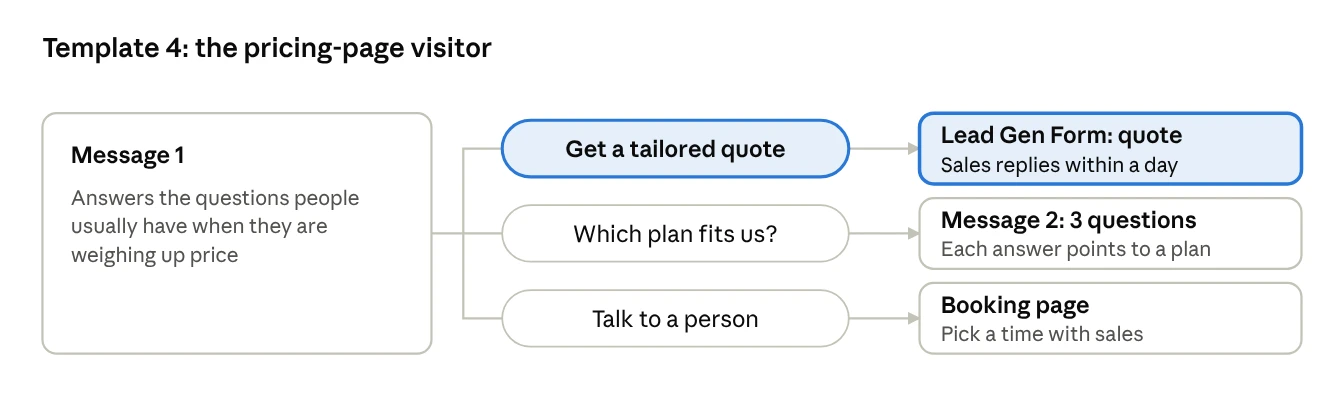
Subject: Questions about pricing? Here are quick answers
Hi %FIRSTNAME%, when teams look at pricing, they usually ask us three things: what’s included, how long setup takes, and which plan fits. Short answers: [answer 1], [answer 2], and it depends on [one factor].
Happy to put together a quote for [Company], or point you to the right plan in under a minute.
Buttons: Get a tailored quote · Which plan fits us? · Talk to a person
Message 2 (after “Which plan fits us?”):
Quick check: how many people would use it?
[Under 20] [20 to 200] [Over 200]
Each answer then leads to a short message recommending one plan, with a “Get a tailored quote” button.
Tip: never mention that you know they visited your pricing page. LinkedIn retargeting doesn’t show you who visited, and saying so would feel creepy anyway. Let the message speak to the kind of questions pricing visitors have.
Template 5: The peer proof story
Best for: a single industry where you have a strong customer story.
Audience: your target accounts in that industry, or warm audiences filtered by industry.
Why it works: buyers trust peers more than vendors. LinkedIn and Edelman found that 90% of B2B decision makers say referrals from people they know and respect earn their attention. A story from someone just like them is the next best thing.
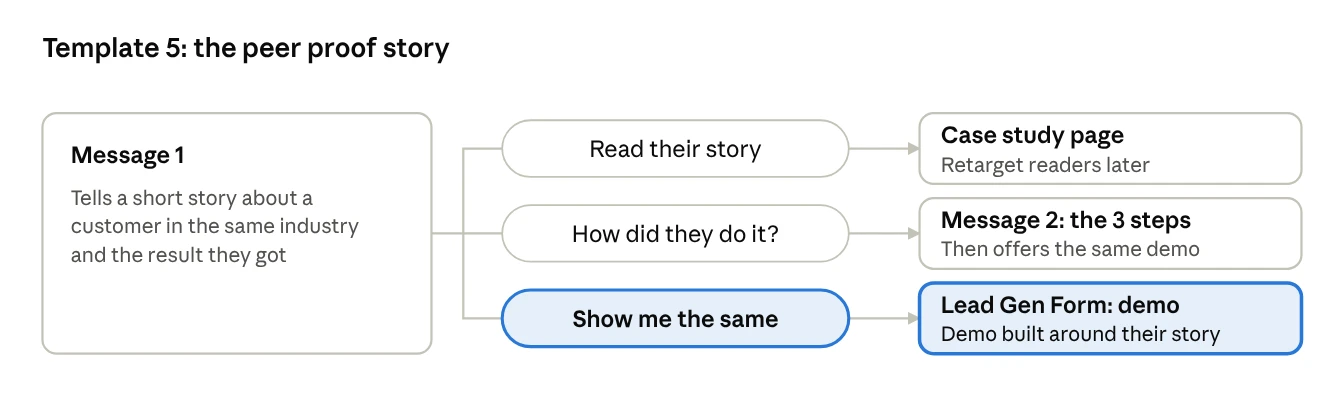
Subject: How [Customer] cut [problem] by [result]
Hi %FIRSTNAME%, [Customer], a [size] [industry] company, had the same problem many [job title]s tell us about: [problem in their words].
In [timeframe], they [result]. The story is short and honest, including what didn’t work at first.
Buttons: Read their story · How did they do it? · Show me the same
Message 2 (after “How did they do it?”):
Three steps: [step 1], [step 2], [step 3]. The second one made the biggest difference. Want me to walk you through how the same steps would look at [Company]?
[Show me the same] [Send me the story]
Tip: pair this template with a Thought Leader Ad of the customer’s own post about you, if they’ve written one. LinkedIn lets you sponsor posts from people outside your company, with their permission.
Template 6: The free assessment
Best for: services, consulting, or any product where a quick expert review shows value fast.
Audience: warm audiences of decision makers, such as page visitors and video viewers in your target industries.
Why it works: a demo asks people to watch you. An assessment gives them something about their own business. That’s a much easier yes.
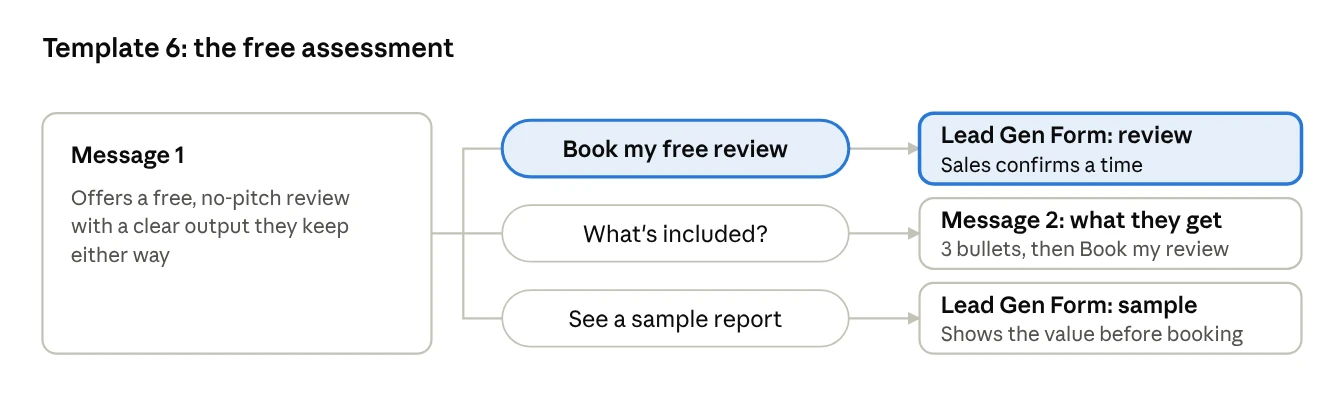
Subject: A free [area] review for [Company]
Hi %FIRSTNAME%, each month we do a handful of free [area] reviews for [job title]s. In 30 minutes, we look at [two or three things] and send you a short written summary of what we’d fix first.
You keep the summary whether or not we ever work together.
Buttons: Book my free review · What’s included? · See a sample report
Message 2 (after “What’s included?”):
You’ll get:
A score for [area 1], [area 2] and [area 3]
The one change with the biggest impact
A one-page summary to share with your team
[Book my free review] [See a sample report]
Tip: LinkedIn’s Campaign Manager includes a ready-made Conversation Ad template for offering professional services. It’s a useful starting point for this one.
Template 7: The founder’s note
Best for: senior leaders at your most important accounts, once they’ve seen your founder’s posts for a few weeks.
Audience: your top account list, filtered to director level and above, ideally people who engaged with the founder’s Thought Leader Ads.
Why it works: a short, honest note from a founder stands out in a crowded inbox. LinkedIn notes that a recognised, credible sender helps results.
Subject: A short note from [Founder name]
Hi %FIRSTNAME%, I’m [Name], founder of [Company]. I’ll keep this brief.
We started [Company] because [one-sentence reason]. Today we help [type of company] [outcome]. I’d value 20 minutes to hear how [Company] handles [problem], and share what we’re seeing across [industry]. If the timing isn’t right, no problem at all.
Buttons: Book 20 min with me · Send me the one-pager · Not now, stay in touch
Message 2 (after “Not now, stay in touch”):
Completely understand. I write a short monthly note on [topic] here: [link]. If it’s ever useful to talk, just reply to any issue.
Tip: keep this audience realistic. LinkedIn recommends keeping message ad audiences above 15,000 people, and every audience needs at least 300. If your top account list is small, widen the job functions rather than shrinking the message.
How to build any of these in Campaign Manager
Pick the objective first, then build the message tree one button at a time.
Create a campaign with the lead generation, website visits, website conversions or brand awareness objective. For demo booking, lead generation is usually the best fit.
Choose Conversation Ads as the format, and set the audience to your retargeting or account list.
Pick a sender. Use a real person whose profile looks complete and current.
Write the subject and intro message. Use the macro menu to insert first name, company name or job title.
Add buttons. For each one, choose its action: open a landing page, open a Lead Gen Form, or show the next message. Then click Edit response to write that next message.
Preview every path. Click through each button in the preview to make sure no branch is a dead end.
Launch on a Tuesday or Wednesday. That’s when LinkedIn suggests launching message ads.
You don’t have to start from a blank page. Campaign Manager includes Conversation Ad templates for goals like driving trials and demos and offering professional services. Load one, then rewrite it with the copy from this article.
How to measure them
Judge each template by meetings booked, not by opens. LinkedIn gives you detailed click reporting for every button, plus a Conversation Ad flowchart to compare clicks at each step. In Campaign Manager, choose Sponsored Messaging from the Performance menu to see it.
| Look at | What it tells you |
|---|---|
| Clicks on each button | Which offer people actually want |
| Drop-off between message 1 and message 2 | Whether your second message keeps the promise of the first |
| Lead Gen Form completion rate | Whether your form asks for too much |
| Meetings booked per 1,000 sends | The number that pays the bills |
One more useful trick: people who opened a conversation or clicked any button can become their own retargeting audience. Show them a case study in the feed a week later, and you’ve got a second touch for free.
Common mistakes
Every button says “Book a demo”. That’s not a choice. Give people a lighter option too.
The message is a wall of text. Stay near 500 characters. Use short paragraphs.
Sent from the company, not a person. Conversations are between people.
Dead-end branches. Every button should lead somewhere useful.
Sending to cold audiences. These templates assume people have seen you before.
Pretending to know what they did. Never say “I saw you visited our pricing page”. Talk about the kind of questions people have.
Forgetting Europe. Conversation Ads can’t target members in the EU. Plan a different route there.
Frequently asked questions
What’s the difference between Message Ads and Conversation Ads? A Message Ad has one button. A Conversation Ad has several buttons and can branch into more messages. LinkedIn’s best-practice page notes that short Message Ad body text, under 500 characters, drives 46% higher click-through on average. All seven templates here are built as Conversation Ads.
Can I remove the “Not interested” button? No. LinkedIn now adds it automatically to the first message. When someone clicks it, LinkedIn shows them fewer ads from that ad set, which protects your audience from feeling spammed.
How many messages should a conversation have? Two or three is plenty. LinkedIn’s own guidance is two to three messages with at least two buttons each.
Can I send the same template to the same person twice? LinkedIn strictly limits how often one member receives sponsored messages, so plan each send carefully rather than relying on repeats.
How long do these messages stay in someone’s inbox? Conversation ads move to the Archived folder after 60 days, though people can still open them there.
Need High-Converting Conversation Ads Built for Your Team?
We design, write, and optimize branching LinkedIn Conversation Ads that book demos with your exact target accounts.
Sources
All from LinkedIn’s official sites.
Conversation ads advertising specifications: LinkedIn Help
Create conversation ads in Campaign Manager: LinkedIn Help
Conversation Ads: LinkedIn Help
Create Successful Message Ads: LinkedIn Help
Best Practices for Sponsored Messaging
Best Practices for Ad Targeting
Retargeting with Matched Audiences: LinkedIn Help
Get started with LinkedIn website retargeting: LinkedIn Help
Create an Event Audience: LinkedIn Help
7 New LinkedIn Ads Features to Stretch Your Budget: LinkedIn Marketing Blog