
Short answer: outreach works far better when the buyer already knows your name. LinkedIn ads let you introduce yourself to your target accounts for weeks before your sales team sends a single message. Then, when the message lands, it feels like a note from someone familiar, not a stranger.
This guide shows you how to do warm outreach with LinkedIn ads, step by step. Every number comes from LinkedIn’s own pages, linked at the end.
Imagine two knocks on your door
Picture a Saturday morning. Someone knocks on your door.
Knock one: a stranger in a suit. You’ve never seen him before. He starts talking about solar panels. You smile politely, say “not today”, and close the door. You don’t even remember his company name an hour later.
Knock two: it’s the woman from three houses down. You’ve waved at her for months. You’ve seen her name on the community notice board, and last week she gave a short talk at the residents’ meeting that was actually useful. She says, “Hey, I’m helping a few neighbours with solar. Want me to drop off a one-page comparison?” You say, “Sure, why not.”
Illustration: a cold knock versus a warm knock
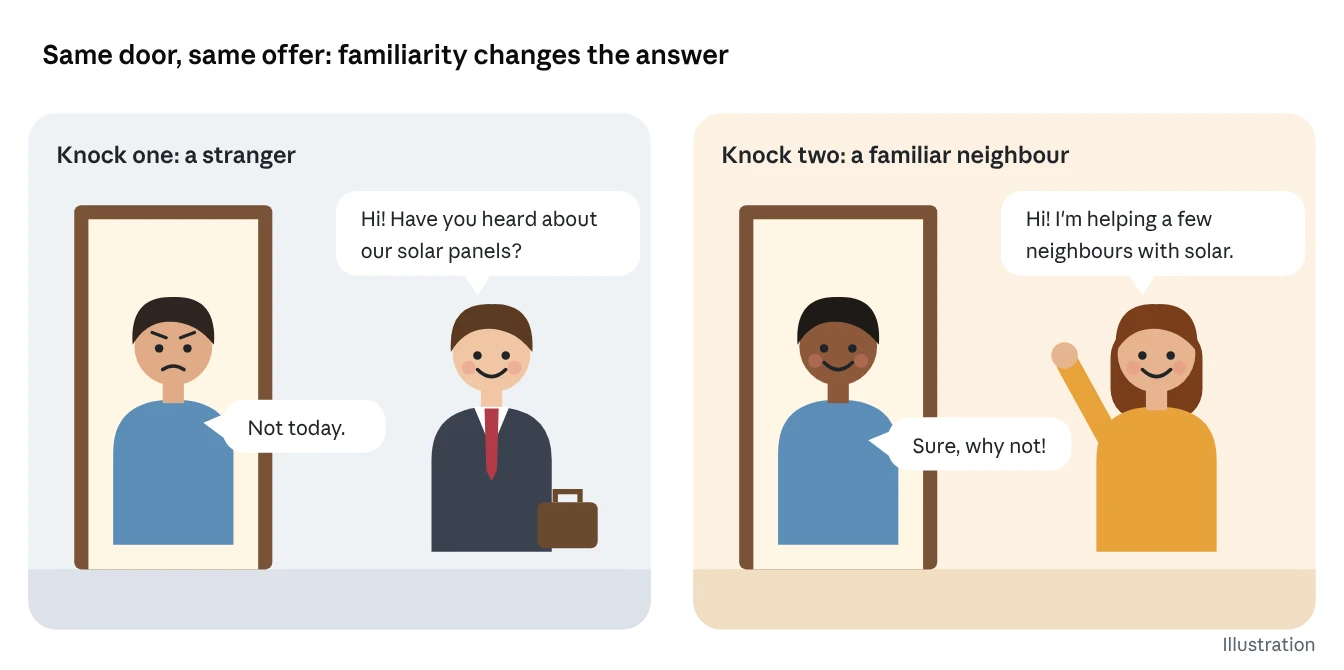
Same product. Same offer. Same door. The only difference is familiarity.
That’s the whole idea of this article. Most B2B outreach today is knock one. Cold emails, cold InMails and cold calls arrive from strangers. LinkedIn’s own sales team says it bluntly: cold outreach is a dying approach, and sellers using spammy mass emails see about a 1% response rate.
The fix isn’t a better subject line. It’s becoming the neighbour before you knock.
The idea in one minute
Strip away the buzzwords and warming up accounts is a very simple idea.
The short version:
Before you ask someone for a favour, let them see you a few times first. Show up where they already hang out. Say something helpful. Let them notice your face and your name. Then, when you finally ask, they already know who you are, so they’re far more likely to say yes.
That’s it. That’s the strategy. Everything else in this article is just how to do that on LinkedIn, with ads, without being creepy or wasting money.
In practice, that means three steps:
- Pick the companies and job titles you want to sell to.
- Show those exact people useful LinkedIn ads for a few weeks, so your brand and your people become familiar.
- Watch who engages, then send personal messages and sales outreach to the ones who are now warm.
Key terms in this article:
| Term | What it actually means |
|---|---|
| Cold account | A company that has never heard of you |
| Warm account | A company whose people have seen, clicked or engaged with your stuff |
| Retargeting | Showing ads again to people who already interacted with you once |
| Matched Audiences | LinkedIn’s tool for building your own custom lists of people to show ads to |
| Insight Tag | A small piece of code on your website that tells LinkedIn who visited (anonymously, in groups) |
| Conversation Ads | Ads that arrive in the LinkedIn inbox as a message with clickable reply buttons |
| Thought Leader Ads | Ads that boost a real person’s post (like your CEO’s), not your company page’s |
| ABM (account-based marketing) | Marketing aimed at a specific list of named companies instead of “everyone” |
If you remember nothing else: ads first, so the message isn’t the first time they hear from you.
Why cold outreach feels so cold: the 95-5 rule
Most of your buyers aren’t shopping today, so a cold pitch hits them at the wrong moment. LinkedIn’s research arm, the B2B Institute, studied this with the Ehrenberg-Bass Institute. Their finding, called the 95-5 Rule, is that about 95% of your potential buyers aren’t ready to buy right now.
Illustration of the 95-5 Rule · LinkedIn B2B Institute with the Ehrenberg-Bass Institute
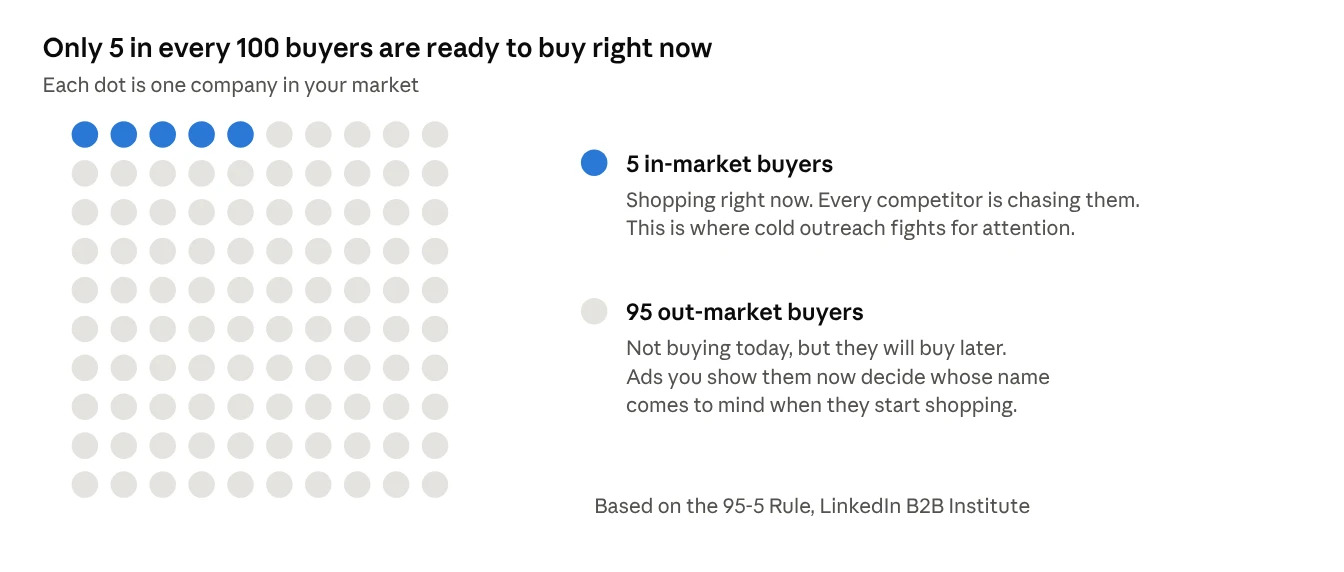
Why? Because businesses don’t buy most things often. LinkedIn’s research gives everyday examples: 75% of companies buy computers only once every 4 years, and 80% change banking services only once every 5 years.
Think about your own life. You don’t buy a fridge every month. If a fridge salesman calls you today, you hang up, not because his fridge is bad, but because you already have one. But the day your fridge dies, which brand pops into your head first? Probably the one you’ve seen around the most.
That’s the trap with cold outreach. It only works on the 5% who happen to be shopping today. And everyone else is chasing that same 5%. The other 95% ignore you, and worse, they forget you.
There’s also a timing myth. In a LinkedIn study, 96% of B2B marketers expected to see the main effect of their ads within 2 weeks. LinkedIn calls that belief a myth. Ads work more like planting seeds: you plant now, and the harvest comes when the buyer is finally ready.
In tough economic times it gets more extreme. LinkedIn notes the share of in-market buyers can drop to as low as 1% as companies delay purchases.
So the smart move is: use ads to become familiar to the whole market, then reach out to the people who start showing interest.
What “warm” actually means (and why it works)
A warm account is one where real people have already seen, noticed or engaged with your brand, so your name isn’t new to them. That’s all. It doesn’t mean they love you. It means you’re not a stranger.
Marketers have a fancy term for this: mental availability. Professor Jenni Romaniuk of the Ehrenberg-Bass Institute describes it as increasing the chance that your brand comes to mind in buying situations. LinkedIn’s B2B Institute puts it even more simply: the brand that gets remembered is the brand that gets bought.
Here’s a surprising part of that research. The biggest problem for most B2B brands isn’t that buyers dislike them. It’s that buyers have never heard of them. Being ignored hurts far more than being disliked.
Does familiarity really change replies? LinkedIn’s own numbers
Yes, and by a lot. LinkedIn has measured what happens when a buyer already knows something about you before your message arrives:
| What the buyer already did | What LinkedIn found |
|---|---|
| Follows your company on LinkedIn | 181% more likely to accept your InMail |
| Saw both your brand ads and your lead-gen ads | 6x more likely to convert than those who saw only one type |
| Was exposed to your ads on LinkedIn | 33% increase in purchase intent |
| Shares a connection with the seller | 19% fewer InMail rejections |
| Was messaged when showing buying signals | 71% increase in InMail response |
Read the first row again. Simply following your company page nearly triples the chance someone accepts your message. And company follows are exactly what a warm-up ad campaign builds.
Why familiarity works
It comes down to three simple human habits:
- People trust what’s familiar. If you’ve seen a name ten times, your brain files it as “safe”.
- People are busy. A message from a stranger takes effort to judge. A message from a known name gets a shortcut: “Oh, them. I’ve seen their stuff.”
- People skip anything that looks like spam. Cold messages look like spam because they are the first contact. Warm messages aren’t.
Illustration: a message from a stranger versus a familiar name
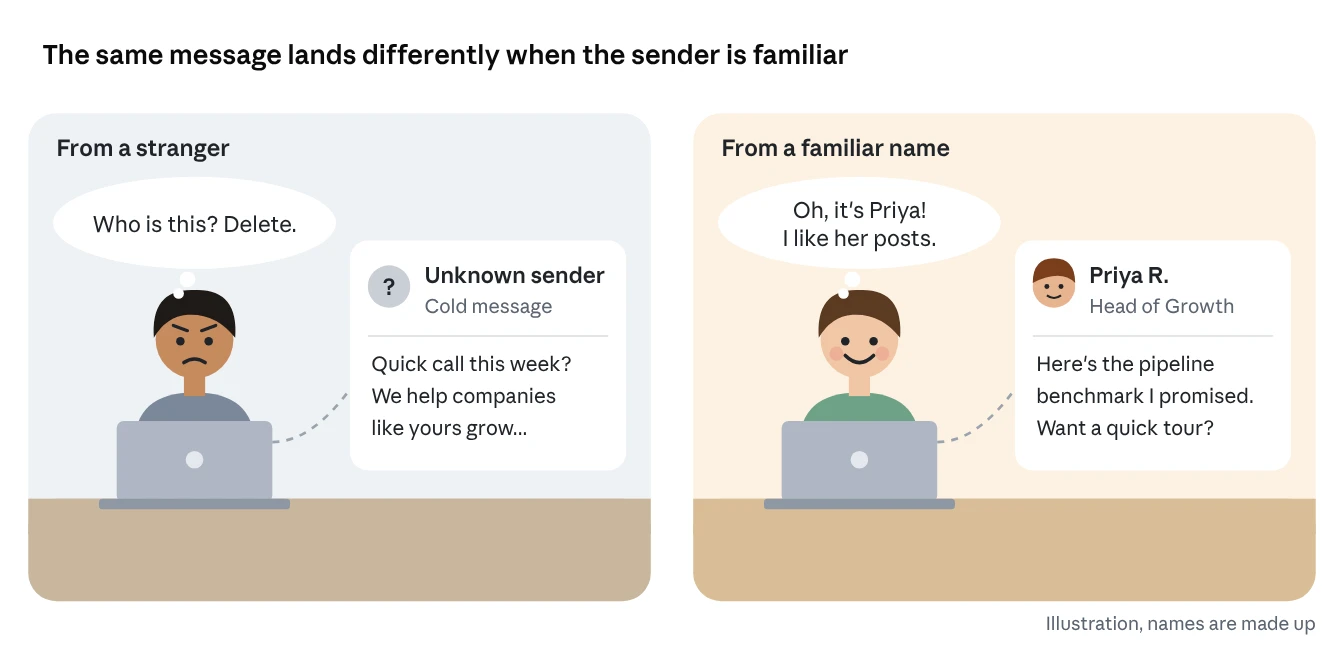
That’s the whole science, really. Ads don’t magically make people buy. They make people recognise you, so when you finally ask, the door opens.
The warm-up ladder: the whole strategy in one picture
Warming an account takes four steps, and ads do the first three for you. Your sales team only steps in once people have shown they recognise you.
The warm-up ladder · Confia framework built on LinkedIn Matched Audiences
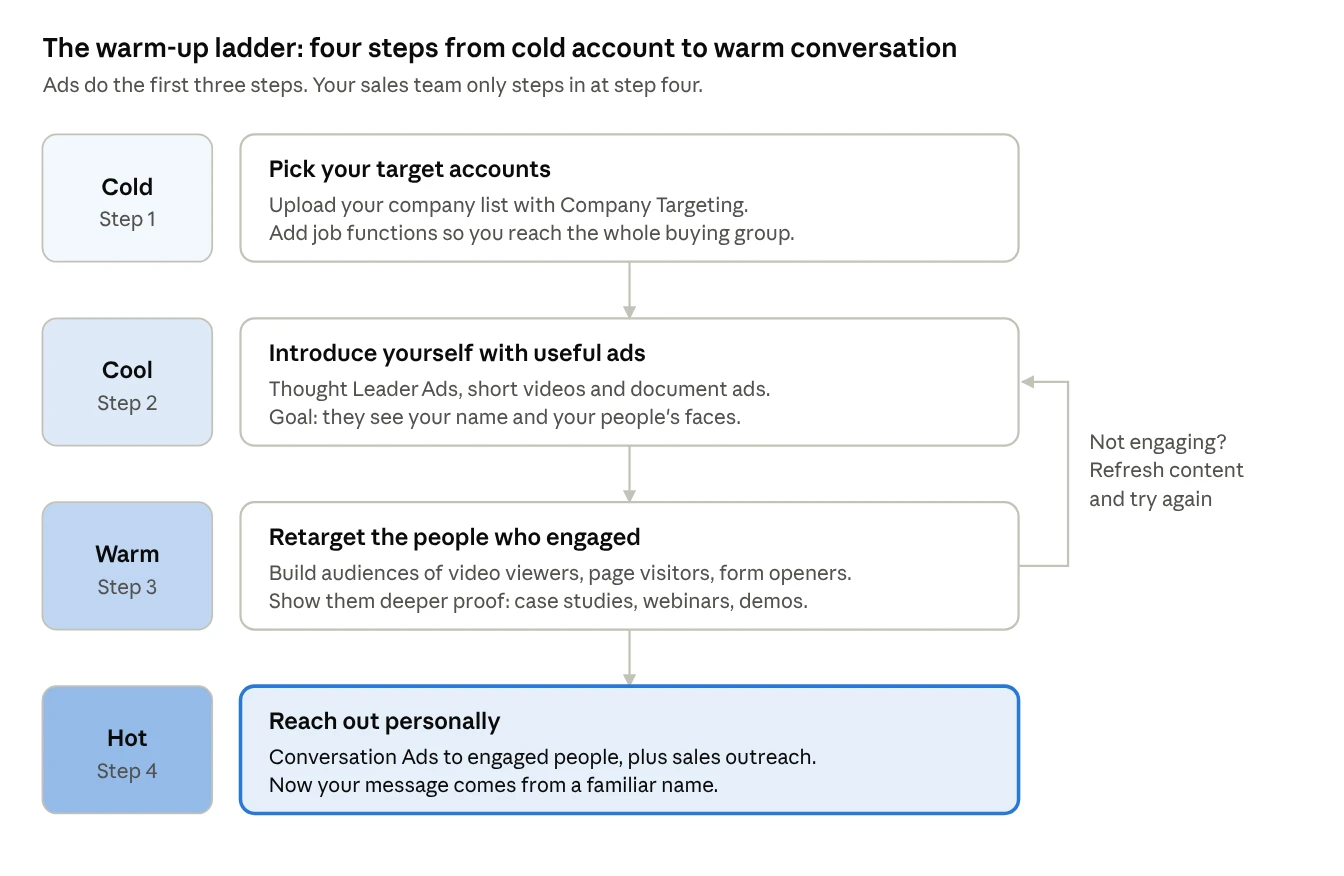
Here’s each step in a sentence:
- Pick your accounts (Cold). Decide exactly which companies you want, and tell LinkedIn the list.
- Introduce yourself (Cool). Show those companies helpful posts, videos and guides, ideally from real people at your company.
- Retarget the curious (Warm). LinkedIn tells you, in groups, who watched, clicked or visited. Show those people your deeper proof.
- Reach out (Hot). Now send personal messages. Your name isn’t new anymore.
The loop on the right matters. If an account doesn’t engage after a few weeks, don’t send a cold message out of impatience. Refresh the content and keep warming. LinkedIn itself warns that ad performance tends to drop when the same ad runs week after week, and recommends refreshing creative at least once a month.
This is the same pattern LinkedIn describes in its own account-based marketing guide: start with Sponsored Content to a select audience, then follow up with a short, personal message from a sales rep.
Step-by-step setup in Campaign Manager
You need three things before any ad runs: the Insight Tag on your website, a list of target companies, and audiences built from people who engage. Everything happens inside LinkedIn Campaign Manager, LinkedIn’s free tool for running ads.
Step 1: Install the LinkedIn Insight Tag (one time, 15 minutes)
The Insight Tag is a small snippet of code you paste on every page of your website. Think of it like a guest book at the door of a shop: it doesn’t record names you can see, but it tells you what kind of people walked in.
LinkedIn says the tag helps you track conversions, retarget visitors, and see the professional traits of your website visitors. You only install it once, and then you can retarget visitors to any page.
Tip: put it in your website’s global footer, so it sits on every page. LinkedIn’s own marketing team recommends exactly that.
Step 2: Upload your target company list
This is your “who we want” list. In LinkedIn’s words, Company Targeting lets you upload up to 300,000 company names and match them against Company Pages on LinkedIn.
- Make a spreadsheet with one company per row: company name, website, industry and country.
- Save it as a CSV file.
- In Campaign Manager, go to Plan → Audiences → Create audience, and choose to match based on a list of accounts.
- Upload the file and wait. Matching can take up to 48 hours.
Don’t go too small. LinkedIn recommends at least 1,000 companies in your list, because tiny lists limit how often your ads can be shown.
Step 3: Add the right people inside those companies
A company doesn’t buy. A group of people inside it buys. So layer job functions or seniority on top of your company list.
But don’t overdo it. LinkedIn suggests keeping your audience above 50,000 people for Sponsored Content and above 15,000 for Message Ads. Too many filters and your ads barely show.
A simple rule: target by function (Finance, IT, Operations) rather than exact job titles. LinkedIn’s marketing team notes that you can’t be sure only senior people weigh in on a purchase, so cast the net across the whole department.
Step 4: Build your warm audiences
This is where the magic happens. Once your intro ads run, LinkedIn can turn everyone who engaged into a new, smaller, warmer audience.
Matched Audience sources · LinkedIn Help Center, Retargeting with Matched Audiences
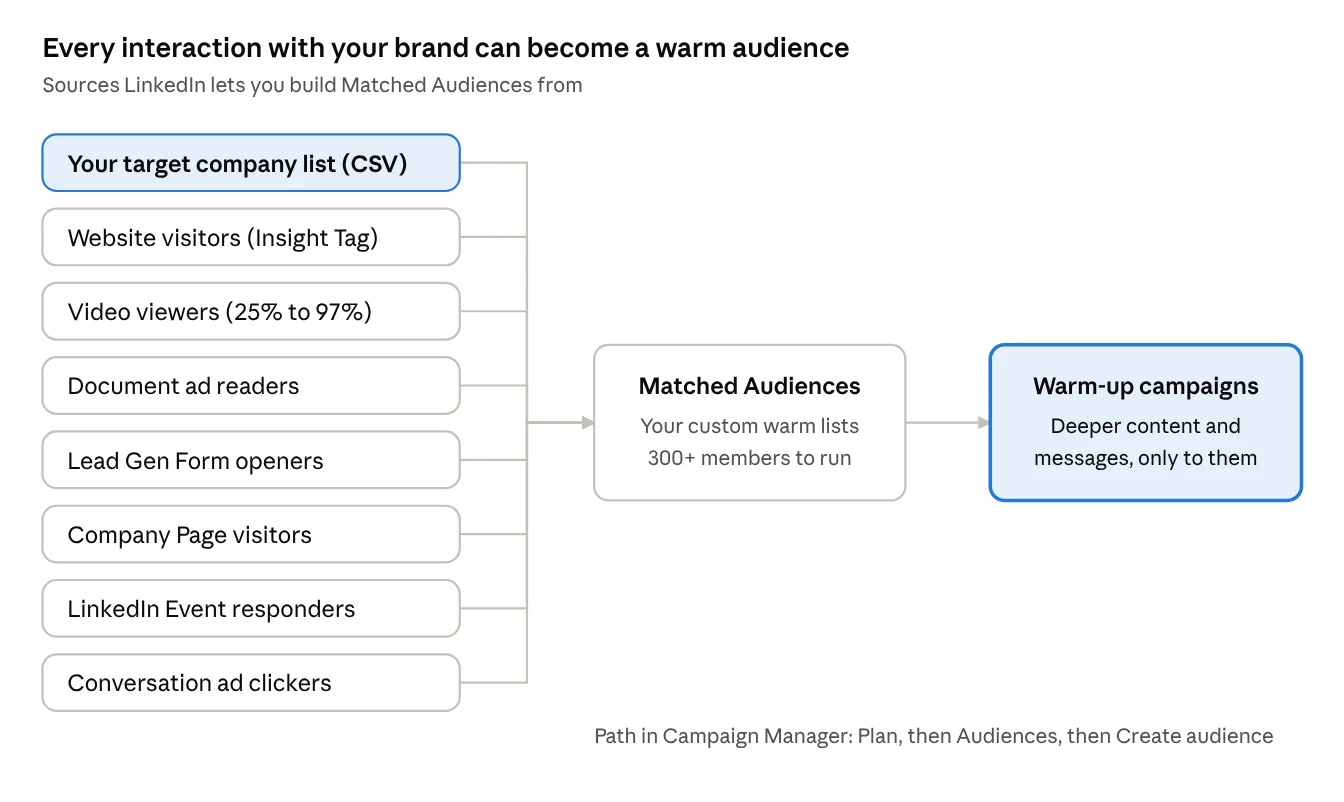
A few details from LinkedIn’s Help Center that matter:
- Video viewers: you choose how much they watched: 25%, 50%, 75% or 97%, and how recently, from 30 to 365 days.
- Lead Gen Forms: you can retarget people who opened a form, not just those who filled it in. These are people who almost raised their hand.
- Minimum size: any audience needs at least 300 members before it can run.
- Website audiences: can take about 48 hours to build before the campaign starts serving.
- Use it or lose it: Matched Audiences expire if unused or not updated for 90 days.
- Privacy: in the EU, EEA and Switzerland, LinkedIn only matches members who have opted in, so expect smaller audiences there.
Screenshot tip for your team: take your own screenshots of Plan → Audiences → Create audience inside your ad account as you set this up. LinkedIn’s screens change often, so a fresh screenshot from your account beats any old guide.
Which LinkedIn ad format to use at each step
Use people-led, helpful formats to warm up, and save message ads for the end. Think of it like making a new friend: you chat over coffee a few times before asking for a big favour. The ad formats map onto that same order.
| Ad format | Best ladder step | What it does | What LinkedIn says |
|---|---|---|---|
| Thought Leader Ads | Step 2: Introduce | Boosts a real post from your founder or expert, so prospects meet a person, not a logo | 1.7x higher click-through and 1.6x higher engagement than other single-image campaigns (early pilot, directional) |
| Video ads | Step 2: Introduce | A short story, customer win or quick tip | Videos under 30 seconds saw a 200% lift in completion rates (LinkedIn internal study, 2018) |
| Document ads | Step 2 to 3 | A short guide or checklist people can flip through in the feed | Readers can be retargeted later |
| Event ads | Step 3: Retarget | Invites warm people to a webinar or live session | Event responders become a retargeting audience |
| Lead Gen Forms | Step 3 to 4 | A pre-filled form inside LinkedIn, so nobody has to type their details | LinkedIn says they drive 2x more conversions |
| Conversation Ads | Step 4: Reach out | An inbox message with buttons, like a choose-your-own-path chat | Multiple buttons let people pick what they want: a guide, an event, a demo |
| Message Ads | Step 4: Reach out | A single inbox message with one button | Body text under 500 characters drives 46% higher click-through on average |
Why people beat logos
LinkedIn’s Thought Leader Ads page quotes advertisers saying the same thing in different ways: people enjoy hearing from people, and people trust people. It’s the knock-on-the-door story again. A company page is a stranger in a suit. Your CEO’s post, with her face and her opinion, is the neighbour.
LinkedIn’s own brand research also shows that 75% of would-be buyers say thought leadership helps them decide which vendors make their shortlist. You want to be on that shortlist before the buyer starts shopping.
Pick one “hero” asset per stage
You don’t need every format. A simple, effective setup is:
- Step 2: two or three Thought Leader Ads plus one short video.
- Step 3: one document ad (a checklist or benchmark) and one event or case study.
- Step 4: one Conversation Ad from a real person, plus your sales team’s own outreach.
That’s five or six pieces of content for a full quarter of warming. Very doable.
The reach-out moment: Conversation Ads and the sales handoff
Once an account is warm, reach out two ways at once: a Conversation Ad to the engaged audience, and personal messages from your sales team. The ad does the scale. The seller does the relationship.
What a Conversation Ad is, in one line
It’s a message that lands in someone’s LinkedIn inbox with clickable reply buttons, so they can pick what they want next, like a mini choose-your-own-adventure. LinkedIn describes it as a message decision tree you create, where each button opens a landing page, a Lead Gen Form or the next message.
Illustrative mock-up · specs from LinkedIn Help Center, Conversation ads advertising specifications
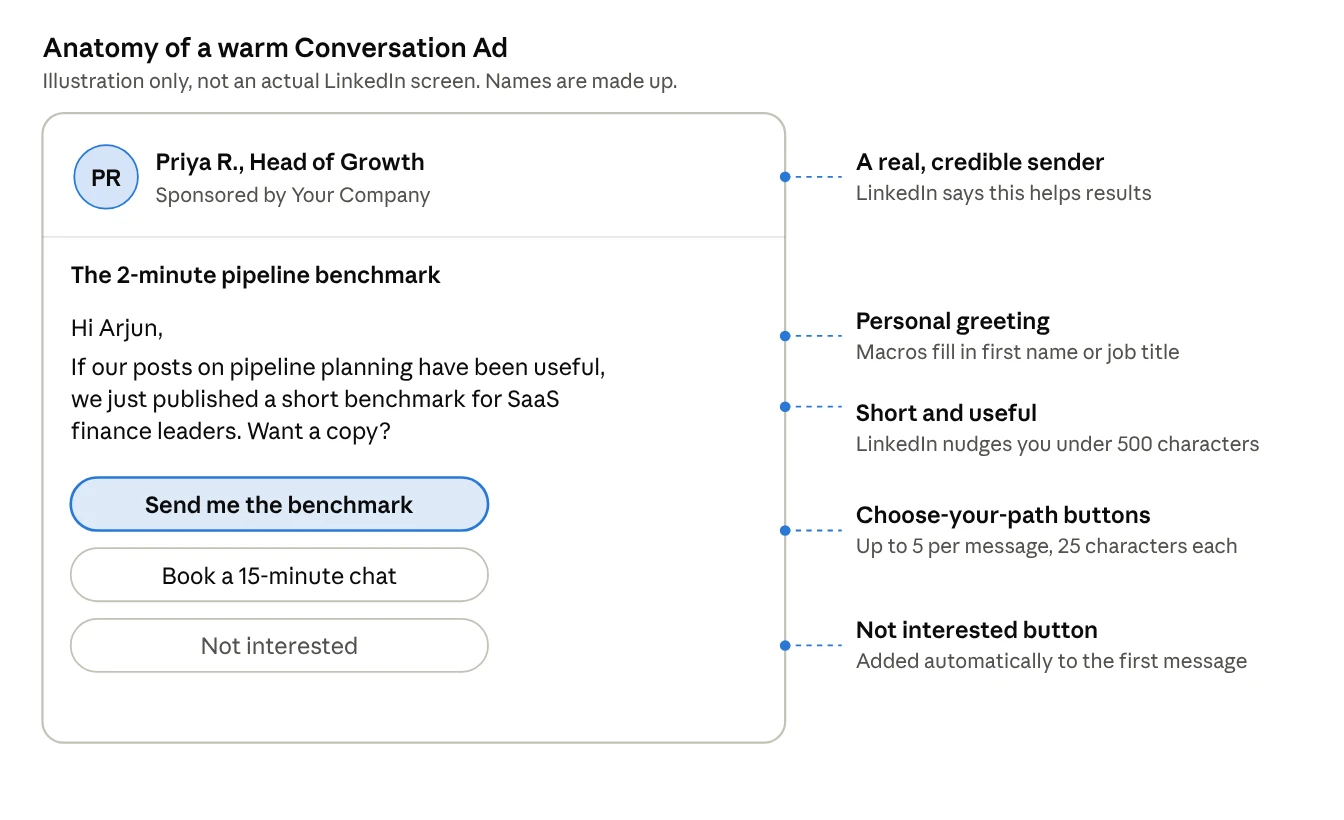
The rules that matter (from LinkedIn’s spec pages)
- Subject line: up to 60 characters. Short, with a clear value.
- Message length: the limit is 8,000 characters, but LinkedIn’s tool nudges you when you pass 500, because fewer characters can drive higher engagement.
- Buttons: up to five per message, 25 characters each. A Not Interested button is now required and added automatically to the first message.
- Sender: LinkedIn notes that sending from a recognised, credible person helps. Use a real leader whose posts you already promoted in step 2. Now the message comes from the same face they’ve been seeing.
- Frequency: LinkedIn strictly limits how often someone receives sponsored messages, so you can’t spam even if you wanted to.
- Best launch days: for message ads, LinkedIn suggests Tuesday and Wednesday.
- Europe: conversation ad campaigns can’t target members based in the EU. For EU accounts, rely on Thought Leader Ads, retargeting and personal sales outreach instead.
The sales handoff: what to do when someone engages
This is where most teams drop the ball. The ads warmed the account. Now a human has to show up, quickly and helpfully.
Illustration: a warm first conversation
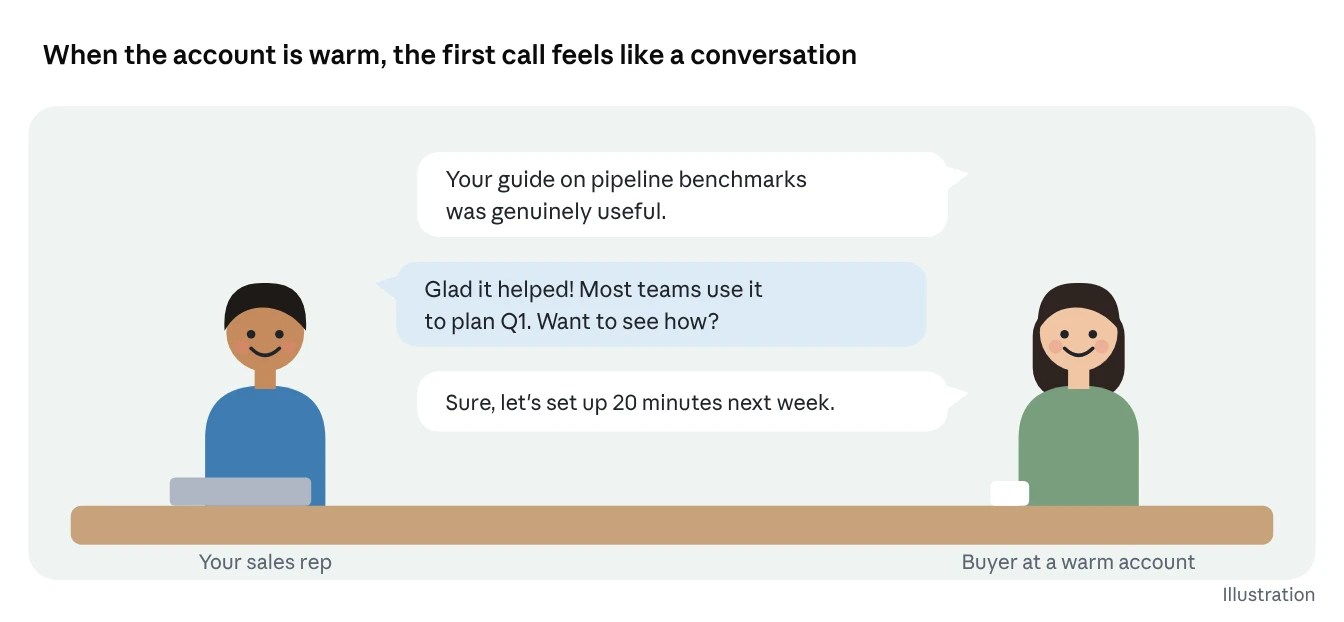
| When you see this signal | Do this next |
|---|---|
| Several people from one account watched your video or read your document | Sales views their profiles, then sends a personal, helpful InMail |
| Someone followed your company page | Add them to the outreach list; followers are 181% more likely to accept your InMail |
| Someone clicked a Conversation Ad button but didn’t book | A rep connects and offers the one thing they clicked on, nothing more |
| Someone filled a Lead Gen Form | Call or email within a day, referencing exactly what they downloaded |
| An account went quiet for 30 days | Back to step 2 with fresh content. No cold pitch. |
Three Sales Navigator facts your reps should know:
- Prospects are 86% more likely to accept your InMail if you view their LinkedIn profile first.
- Keep InMails to 100 words or fewer.
- 68% of buyers say they’re unlikely to engage with a seller who reaches out with information irrelevant to their job. So reference what they actually engaged with.
One small honesty note: LinkedIn shows advertisers engagement in aggregate (by company, job function and so on), not a list of named individuals who saw your ads. So your sales team should use company-level signals and their own Sales Navigator research, not pretend they “saw you watched our video”. That would feel creepy anyway.
How to measure warmth
Measure warmth at the account level, not by clicks alone. One click means little. Five people from the same company engaging over three weeks means a lot.
Think of it like a thermometer for each target company. Here’s what makes the reading go up:
| Warmth signal | Where to find it | Why it matters |
|---|---|---|
| Several people from one company engaging | Campaign Manager demographic reporting, by company | Buying is a group decision; a group noticing you is the goal |
| Video viewers who watched 50% or more | Video retargeting audience | They chose to keep watching, a clear sign of interest |
| New company page followers from target accounts | Page analytics | Followers are far more likely to accept your outreach |
| Website visits from target industries | Insight Tag, website demographics | Interest moved off LinkedIn and onto your site |
| Lead Gen Form opens (even without submits) | Lead Gen Form retargeting audience | They almost raised a hand |
| Conversation Ad button clicks | Sponsored Messaging click reporting | You see exactly which offer they picked |
Two warnings from LinkedIn’s own research:
- Be patient. Remember that 96% of marketers expected results within two weeks, and LinkedIn calls that a myth. Give a warm-up program at least one full quarter before judging it.
- Don’t judge brand ads by clicks. LinkedIn’s B2B Institute argues that marketers over-rely on lead generation mostly because the data is easy to track, not because it produces more sales. The real test is whether warmed accounts reply, book meetings and close more often than cold ones.
The simplest test of all: split your target list in half. Warm one half with ads for 30 to 60 days. Leave the other half alone. Then have sales reach out to both. Compare reply rates. That one experiment will tell you more than any dashboard.
Common mistakes that keep accounts cold
Most warm-up programs fail for boring reasons: too narrow, too salesy, too impatient. Here are the usual suspects, and the fix for each.
- Pitching in the first ad. A “Book a demo” ad to a stranger is still a cold call, just a paid one. Fix: lead with something useful: an insight, a checklist, a story.
- Targeting too narrowly. Ten job titles at 200 companies gives LinkedIn almost no room to deliver. Fix: follow LinkedIn’s guidance of 1,000+ companies and audiences above 50,000 for Sponsored Content.
- Only using the company page. Logos don’t build relationships. Fix: put a real person’s face on the warm-up with Thought Leader Ads.
- Running the same ad for months. People stop noticing it. Fix: refresh creative at least monthly, as LinkedIn recommends.
- Forgetting to exclude customers. Paying to warm people who already buy from you wastes budget. Fix: LinkedIn suggests excluding existing customers from prospecting campaigns.
- Sales and marketing not talking. Marketing warms the account, but sales never hears about it. Fix: a weekly 15-minute review of which accounts got warmer.
- Sending a message ad to everyone. Conversation Ads to a cold audience are just cold outreach with a budget. Fix: send them only to your retargeted, engaged audiences.
- Letting audiences expire. Matched Audiences unused for 90 days expire. Fix: keep them attached to an active campaign.
Your first 30 days
You can launch a basic warm-up program in one month with five or six pieces of content. Here’s a simple week-by-week plan.
| Week | What to do | Done when |
|---|---|---|
| Week 1 | Install the Insight Tag, build your target company list (1,000+ companies), agree on job functions with sales | The list is uploaded and matched |
| Week 2 | Launch two or three Thought Leader Ads and one short video to the target list | Ads are live and spending steadily |
| Week 3 | Build retargeting audiences: video viewers, page visitors, form openers. Launch a document ad or case study to them | Each warm audience has 300+ members |
| Week 4 | Launch a Conversation Ad to the warm audiences only. Share the list of engaged accounts with sales | Sales has started personal outreach to warm accounts |
After day 30, keep the loop running: refresh content monthly, move newly engaged accounts up the ladder, and cycle quiet ones back to step 2.
The whole strategy in four sentences
Here’s everything in this article, boiled down:
- Most buyers aren’t shopping today, so cold messages usually arrive at the wrong time from a stranger.
- LinkedIn ads let you show up for your exact target companies, again and again, with helpful content from real people.
- LinkedIn then tells you which groups engaged, so you can show them more and build familiarity.
- When you finally reach out, you’re the neighbour, not the stranger, and people are far more likely to reply.
Share these four sentences with your sales and marketing teams so everyone works from the same playbook.
Frequently asked questions
How long does it take to warm an account? There’s no fixed number. Plan for at least 30 to 60 days of ads before outreach, and judge results over a full quarter, since LinkedIn’s research shows ad effects take longer than most marketers expect.
Is this just retargeting? Retargeting is one part. The full approach also includes picking named accounts, introducing yourself with people-led content, and coordinating the sales follow-up.
Can I do this on a small budget? Yes. Start with a tighter list of high-value accounts (but still 1,000+ companies), two Thought Leader Ads and one retargeting campaign. Spend more only on what works.
Does it replace cold email? It replaces the cold part. Your team can still email and call, but they’re contacting people who already recognise the brand.
Does it work in Europe? Partly. Matched Audiences only include members who have opted in across the EU, EEA and Switzerland, and conversation ad campaigns can’t target EU members. Thought Leader Ads and sales outreach still work well there.
Ready to Warm Up Your Cold Accounts with LinkedIn Ads?
At Confia, we help B2B marketing leaders build Matched Audience warm-up funnels that make outbound sales 5x more effective.
Sources
All from LinkedIn’s official sites.
- Why You Should Follow the 95-5 Rule: LinkedIn Marketing Blog
- How B2B Brands Grow: LinkedIn B2B Institute
- Performance Branding: LinkedIn B2B Institute
- Advertise to LinkedIn’s Audience of Professionals
- Retargeting with Matched Audiences: LinkedIn Help
- Get started with LinkedIn website retargeting: LinkedIn Help
- Matched Audiences topic: LinkedIn Help
- Best Practices for Matched Audiences
- Company Targeting
- Targeting the Anonymous Buyer: LinkedIn Marketing Blog
- What Is Account Based Marketing: LinkedIn Marketing Blog
- Thought Leader Ads and Thought Leader Ads two-pager (PDF)
- Best practices for video ads
- Brand Awareness
- LinkedIn Conversation Ads
- Best Practices for Sponsored Messaging
- Conversation ads advertising specifications: LinkedIn Help
- Create conversation ads in Campaign Manager: LinkedIn Help
- Conversation Ads: LinkedIn Help
- Create Successful Message Ads: LinkedIn Help
- LinkedIn Ad Creatives: Best Practices: LinkedIn Help
- Benefits of LinkedIn Sales Navigator
- How to Best Use Sales Navigator: 9 Best Practices: LinkedIn Sales Blog
- Activating Buyer-first Principles with Sales Navigator: LinkedIn Sales Blog
- B2B leaders are investing in brand to build market share: LinkedIn Collective